Forum Discussion

Damien_Rosario
Oct 31, 2017Silver Contributor
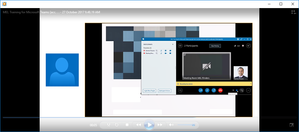
How do I only record my shared desktop screen and not the video feed from other participants?
Hi guys Hopefully I am explaining this right, but when I record a Skype for business meeting, the output looks like the one below. I only want to capture the audio and shared desktop (present...
- Nov 03, 2017
Hi Shane
The issue was happening on my laptop screen when presenting, but I have found a way to get my solution.
By setting all participants as Attendees and also disabling their video feeds, I have found that when I record the meeting it only shows the shared screen I am presenting.
I did notice that when someone had typed out a question, it appeared on the side of the video, but the way to fix that for me might be to disable IM and let people ask questions via audio.
Either way I have my solution which I had to trial and error to get!
Thanks again for all your input!


Thao_Dao_Phuong
May 02, 2019Brass Contributor
Damien_Rosario your capture sometime working, sometime does working. anyway S4B will close, MS not support. you should use MS Team, it's better. :)