Forum Discussion

Multiple chats sessions with same contact in S4B window ?
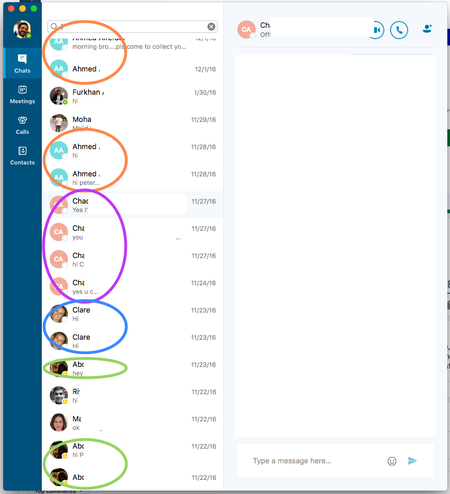

There are several open questions on this thread, and I want to try to address them.
We acknowledge that people are frustrated with the experience of having conversations with a person show up as separate sessions. This is a usability problem for some users, and we invested time exploring a variety of ways to mitigate this in the client. To address the problem, we implemented the Grouped View in the Chats panel in order to bring all sessions with the same user together and simplify viewing and finding chats.
In Preferences, there is an option to Show single window for conversations with same user that sounds like it might affect the behavior of the chats list, but this actually does something else. This setting only applies when Show conversations in separate windows option is enabled, meaning chats are opened in a separate top-level window instead of shown in a panel of the main Skype for Business window. If both settings are enabled, and you have a chat window open with a user, any new messages from that user will be shown in the open chat window. (Before the 'single window' setting was implemented, you could have multiple open windows with the same user.) This is true even if those messages show up in the Chats list as a separate session. These are subtle concepts to explain, and we struggled to find wording for the checkbox in Preferences. Unfortunately, all choices had the potential to be misinterpreted.
The Chats list in Teams is organized around people and groups, so the duplication problem seen in Skype for Business is not an issue. Messaging in Teams is built on a completely different architecture than Skype for Business. Teams has a database for storing messages and does not rely on storing conversations in Exchange, so there is no session concept in Teams chat. Teams is an excellent and growing product. We encourage customers to adopt Teams as our next generation communication product, but many factors go into the decision of which communication product to deploy. For those customers who choose to continue using Skype for Business, we are committed to maintaining and improving Skype for Business for many years to come.
Phil.

Note this change is in the latest update. We had to run update. Trying this today...could be a nice change.
Thanks!
In Preferences, there is an option to Show single window for conversations with same user that sounds like it might affect the behavior of the chats list, but this actually does something else. This setting only applies when Show conversations in separate windows option is enabled, meaning chats are opened in a separate top-level window instead of shown in a panel of the main Skype for Business window. If both settings are enabled, and you have a chat window open with a user, any new messages from that user will be shown in the open chat window.
 Richard StroleNov 01, 2018Copper Contributor
I have that option unchecked and have a chat from yesterday with one person in 10 different windows!
 jordanbauckeNov 19, 2018Copper Contributor
on S4B v.16.23.64
Where is this option: "Show single window for conversations with same user" has it been removed?
- Richard StroleNov 19, 2018Copper Contributor
I believe you just uncheck the first option in your screenshot but that did nothing for me.
 Gabriel MoranOct 17, 2018Copper Contributor
We just migrated our entire office to S4B and have noticed this issue. Absolutely insane this is even a thing.