Forum Discussion

Fouziya
May 31, 2018Copper Contributor
Set SharePoint access requests to owner group
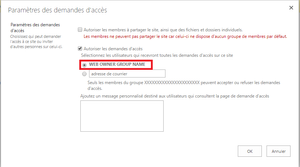
How can I set the Access Request Settings to the Owner group on an O365 SharePoint site ? I could not find any method in PnP PowerShell or CSOM... Set-PnPRequestAccessEmails only allows to set email...

Yu Chen
Feb 13, 2020Copper Contributor
StephenRice any update on public property Microsoft.SharePoint.Client.Web.UseAccessRequestDefault being able to email site Owners group (and not set an individual email)?
Many thanks.

sbammer
Apr 29, 2022Copper Contributor
Has this ever been addressed StephenRice????
 SherisaReedJun 12, 2023Brass ContributorWeird! It's doing that to me too now. Basically, you need to go to <SP Site URL>/_layouts/15/permsetup.aspx where it will give you the opportunity to re-assign the permission group (create a new group or use an existing group). There you should be able to choose the correct group. This will apply the permissions and also update the Access Requests option. (For Members/Visitors, you would just select what you are already using (you can always remove those later if needed).)
 SHC_HDQ-PTHMay 23, 2023Copper Contributor
SherisaReed we are still having this issue & the link to the 'fix' you've been using is blocked by our security. Can you please explain how you fixed it? Our issue is that the default Owner group was created & correctly assigned, but the site & SP Owner group was renamed. Now we don't know how to put the correct Owner group in the Access Request Settings & prefer not to specify using an email group or individual email. Assistance from anyone is greatly appreciated!
- SherisaReedNov 17, 2022Brass ContributorI never saw it addressed on this thread, but this is the fix that I've been doing for a couple years now. https://sharepointviews.com/sharepoint-site-default-access-groups/
Once you reset the Permissions groups, then you can go to the Access Request settings and it will be updated to show as the group to select (and adjust if it doesn't do it automatically)