Forum Discussion

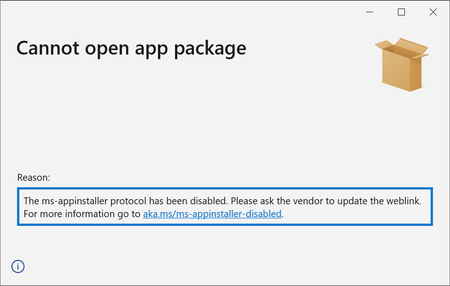
The ms-appinstaller protocol has been disabled.
 Dec 15, 2021
bvenhaus Thank you for your question. We removed the ms-appinstaller custom scheme due to a security vulnerability. We do intend to bring this back, and are working on it. For now, you can update the link on your website by removing 'ms-appinstaller:?source='
<html>
    <body>
        <h1> MyApp Web Page </h1>
        <a href="http://mywebservice.azureedge.net/HubApp.msix"> Install app package </a>
        <a href="http://mywebservice.azureedge.net/HubAppBundle.msixbundle"> Install app bundle  </a>
        <a href="http://mywebservice.azureedge.net/HubAppSet.appinstaller"> Install related set </a>
    </body>
</html>

If my understanding is correct, we just need to remove "ms-appinstaller:?source=" in index.html generated by Visual Studio.
In other words:
Change
<a href='ms-appinstaller:?source=https://www.mydomain.com/download/myapp.appinstaller'>
to
<a href='https://www.mydomain.com/download/myapp.appinstaller'>

It would appear this workaround requires end users to download, save, and open the application bundle. This is something we try to drill into there heads that they should not do. It also means that apps that normally automatically update will not be able to do so. Can you imagine Android or iOS disabling auto updates globally??? Unbelievable! As a result this only a partial work-around creates more problems than it solves, especially if updates need to distribute current data with the application. PLEASE MICROSOFT provide guidance on how long it will be before side loading from a web site will be enabled again!!!
 27k1ismsJan 12, 2022Copper ContributorI assume the Engineer responsible for this has carried out a thorough risk assessment, taking into account customer impact and loss of service.
This is despicable, can anyone in Microsoft be actually bothered to reply. Also what compenmsation scheme is in place for Microsoft customer.
@hrb-1 PLEASE MICROSOFT provide guidance on how long it will be before side loading from a web site will be enabled again!!!