Democratizing Inference with Orchestration
The adoption of models continues to grow across industries. As highlighted in a prior blog post, we’ve released a range of geospatial AI models designed to extract valuable insights from satellite imagery. While these models are accessible through Microsoft Foundry, operationalizing these models involve coordinated multi-stage inference workflows:
- Managing Inputs: Geospatial inference may require defining parameters such as geographic boundaries of interest, time ranges, data formats, spatial filters, inference settings, and desired output formats.
- Executing Inference: Inference may involve pipelines that integrate input data sources, partition geographic areas into smaller processing units, connect to model endpoints, execute inference, monitor jobs, and post-process results. Behind what looks like a single inference request often sits an entire distributed processing system.
- Accessing Results: Once inference is complete, model outputs need to be stored, organized, and made accessible and discoverable for downstream analysis.
Bringing all of these pieces together into a repeatable workflow can be complex.
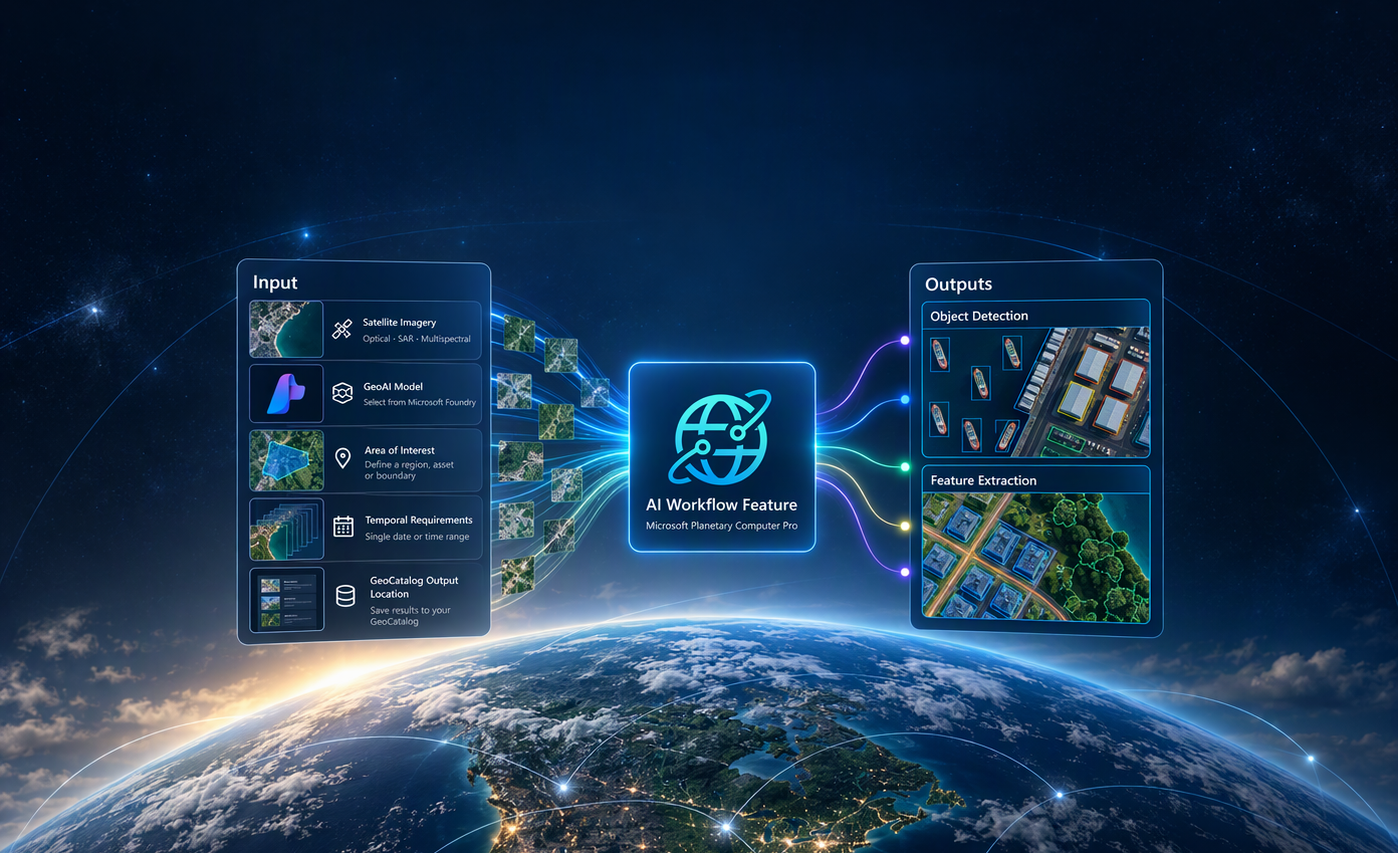
To simplify the coordination of these steps, we invite customers to use AI Workflow, a preview feature in Microsoft Planetary Computer Pro. AI Workflow provides an API-driven orchestration layer that connects geospatial data with AI models deployed through Microsoft Foundry, coordinating data processing, workload partitioning, model inference, job monitoring, and output management. It is designed to reduce the need for custom inference pipelines for supported models, allowing developers to focus on geospatial analysis rather than managing the underlying infrastructure.
Figure 1 - Reference architecture diagram illustrating how input data and model endpoints are coordinated through AI Workflow, with resulting outputs stored and accessed through Microsoft Planetary Computer Pro.
Assessing Earthquake Impact using AI Workflow:
To illustrate how AI Workflow works in practice, Microsoft used the feature as part of a real-world response use case following the earthquake in Pereira, Colombia in August of 2026. The effort explored how geospatial AI could help accelerate post-event analysis by bringing together a feature extraction model and satellite imagery pre- and post-earthquake.
First, using AI Workflow in Microsoft Planetary Computer Pro, the team defined an area of interest around the earthquake impact zone and selected imagery from two time periods: August 8, 2026, prior to the earthquake, and August 11, 2026, immediately following the event. The imagery was cataloged in Microsoft Planetary Computer Pro, providing a consistent and discoverable data source for inference and analysis.
Figure 2 - Input Imagery of Pereira Colombia, Sourced from Vantor © 2026 Open Data Program, Ingested into Microsoft Planetary Computer Pro
The team then deployed the Microsoft MARS Feature Extraction model through Microsoft Foundry and invoked AI Workflow through Python-based APIs. Using user defined spatial and temporal parameters, AI Workflow retrieved the applicable imagery from Microsoft Planetary Computer Pro, submitted it for model inference, monitored processing, and cataloged the resulting feature layers back into Planetary Computer Pro as STAC items.
The output consisted of vectorized building footprints generated by the MARS model as shown on the right image in Figure 3, illustrating a comparison to the original satellite imagery shown on the left. These feature layers supported analyst-led change analysis and could be visualized in Microsoft Planetary Computer Pro or integrated into downstream GIS platforms. Response teams remained responsible for validating the outputs against source imagery, field reports, and authoritative data before using them for disaster-response planning.
In Microsoft’s internal test, processing a 254 square km area of Pereira with 2xH100 GPU nodes took approximately two hours. This analysis was completed using just a handful of API calls from a local notebook, without requiring complex cloud infrastructure or labor costs associated with traditional surveying approach. The processing time reflects internal testing and is not guaranteed, as performance varies depending on the model, input data size, compute configuration, and region.
Figure 3 – Evaluating post-earthquake conditions in Pereira, Colombia, using AI Workflow and the MARS model. The left image shows raw satellite imagery sourced from Vantor © 2026 Open Data Program. The right image displays building vectors extracted by the MARS model through inference orchestrated by AI Workflow.This example highlights how the value of AI Workflow extends beyond simply running a geospatial AI model. It helps organizations streamline the inference pipeline, from collating inputs through model execution and data cataloging. By connecting data, models, compute, and geospatial outputs into a repeatable workflow, organizations can move from raw imagery to actionable insights significantly faster, enabling more informed decisions when time matters most.
Key Benefits of Using AI Workflow
AI Workflow provides several benefits for geospatial operations:
- Connect geospatial data, models, and outputs through API calls
- Combined with Microsoft Foundry, it offers cloud-based inference service that hosts and operationalizes geospatial AI models without developing custom code and inference pipelines
- Centralizes inputs & outputs in Microsoft Planetary Computer Pro GeoCatalog for easy discovery and downstream analysis
Getting Started
We are inviting customers and partners to use AI Workflow with real imagery and operational use-cases. This is an opportunity to test the capability, tell us where it creates value, and help shape what comes next. To request access, submit a form on Planetary Computer Pro - Request to test a Feature in Private Preview – Collaboration. Before getting started, note the following:
- For usage instructions and examples, refer to the AI Workflow Documentation in the Microsoft Planetary Computer Pro GitHub repo.
- AI Workflow currently requires users to have an Azure subscription with Microsoft Planetary Computer Pro deployed as a resource with the required GPU quota needed to run inference on the model of choice. Instructions on how to request quota in Azure can be found on MS Learn.
- AI Workflow Preview currently supports the following 3 models. Model-specific requirements are available on their respective model cards.
References:
- Planetary Computer Pro - Request to test a Feature in Private Preview – Collaboration
- AI Workflow Documentation
- Microsoft Planetary Computer Pro | Microsoft Azure
- Microsoft Planetary Computer Pro | Microsoft Learn

 Microsoft