Forum Discussion

Hide Groups from a Guest User

You should be able to control this via the Azure AD blade -> User Settings -> External collaboration settings -> Guest users permissions are limited. Here's the description of the setting:
Yes means that guests do not have permission for certain directory tasks, such as enumerate users, groups, or other directory resources.
No means that guests have the same access to directory data that regular users have in your directory.
Should be being the keyword..

VasilMichev Thanks for the information
I have "Guest users permissions are limited" already set to Yes. I think this must be the default setting as I haven't changed this.
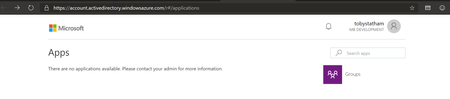
Is this a bug? It says that a guest user does not have permissions to enumerate groups and a guest user can clearly do this.
- May 16, 2019Wait, what? No way this should be the default behavior. Sure hope it's a bug.
- VasilMichevMay 16, 2019MVP
I can enumerate every type of Group as a guest with that setting on. Looks like a bug in my book, but I've asked some folks to clarify on this.
- Toby StathamMay 16, 2019Brass Contributor
So my assumption would be that a Guest User can't enumerate Security Groups, but can enumerate Office 365 Groups. Seems like a flaw to me
- May 16, 2019Yes, that’s the default setting!
According to the link earlier , guests have read to non hidden groups:
“Read all properties of groups
Read non-hidden group memberships
Read hidden Office 365 group memberships for joined groups
Manage owned groups
Add guests to owned groups (if allowed)
Delete owned groups
Restore owned Office 365 groups
Read properties of groups they belong to, including membership.”


