hybrid
365 TopicsI built a free, open-source M365 security assessment tool - looking for feedback
I work as an IT consultant, and a good chunk of my time is spent assessing Microsoft 365 environments for small and mid-sized businesses. Every engagement started the same way: connect to five different PowerShell modules, run dozens of commands across Entra ID, Exchange Online, Defender, SharePoint, and Teams, manually compare each setting against CIS benchmarks, then spend hours assembling everything into a report the client could actually read. The tools that automate this either cost thousands per year, require standing up Azure infrastructure just to run, or only cover one service area. I wanted something simpler: one command that connects, assesses, and produces a client-ready deliverable. So I built it. What M365 Assess does https://github.com/Daren9m/M365-Assess is a PowerShell-based security assessment tool that runs against a Microsoft 365 tenant and produces a comprehensive set of reports. Here is what you get from a single run: 57 automated security checks aligned to the CIS Microsoft 365 Foundations Benchmark v6.0.1, covering Entra ID, Exchange Online, Defender for Office 365, SharePoint Online, and Teams 12 compliance frameworks mapped simultaneously -- every finding is cross-referenced against NIST 800-53, NIST CSF 2.0, ISO 27001:2022, SOC 2, HIPAA, PCI DSS v4.0.1, CMMC 2.0, CISA SCuBA, and DISA STIG (plus CIS profiles for E3 L1/L2 and E5 L1/L2) 20+ CSV exports covering users, mailboxes, MFA status, admin roles, conditional access policies, mail flow rules, device compliance, and more A self-contained HTML report with an executive summary, severity badges, sortable tables, and a compliance overview dashboard -- no external dependencies, fully base64-encoded, just open it in any browser or email it directly The entire assessment is read-only. It never modifies tenant settings. Only Get-* cmdlets are used. A few things I'm proud of Real-time progress in the console. As the assessment runs, you see each check complete with live status indicators and timing. No staring at a blank terminal wondering if it hung. The HTML report is a single file. Logos, backgrounds, fonts -- everything is embedded. You can email the report as an attachment and it renders perfectly. It supports dark mode (auto-detects system preference), and all tables are sortable by clicking column headers. Compliance framework mapping. This was the feature that took the most work. The compliance overview shows coverage percentages across all 12 frameworks, with drill-down to individual controls. Each finding links back to its CIS control ID and maps to every applicable framework control. Pass/Fail detail tables. Each security check shows the CIS control reference, what was checked, what the expected value is, what the actual value is, and a clear Pass/Fail/Warning status. Findings include remediation descriptions to help prioritize fixes. Quick start If you want to try it out, it takes about 5 minutes to get running: # Install prerequisites (if you don't have them already) Install-Module Microsoft.Graph, ExchangeOnlineManagement -Scope CurrentUser Clone and run git clone https://github.com/Daren9m/M365-Assess.git cd M365-Assess .\Invoke-M365Assessment.ps1 The interactive wizard walks you through selecting assessment sections, entering your tenant ID, and choosing an authentication method (interactive browser login, certificate-based, or pre-existing connections). Results land in a timestamped folder with all CSVs and the HTML report. Requires PowerShell 7.x and runs on Windows (macOS and Linux are experimental -- I would love help testing those platforms). Cloud support M365 Assess works with: Commercial (global) tenants GCC, GCC High, and DoD environments If you work in government cloud, the tool handles the different endpoint URIs automatically. What is next This is actively maintained and I have a roadmap of improvements: More automated checks -- 140 CIS v6.0.1 controls are tracked in the registry, with 57 automated today. Expanding coverage is the top priority. Remediation commands -- PowerShell snippets and portal steps for each finding, so you can fix issues directly from the report. XLSX compliance matrix -- A spreadsheet export for audit teams who need to work in Excel. Standalone report regeneration -- Re-run the report from existing CSV data without re-assessing the tenant. I would love your feedback I have been building this for my own consulting work, but I think it could be useful to the broader community. If you try it, I would genuinely appreciate hearing: What checks should I prioritize next? Which security controls matter most in your environment? What compliance frameworks are most requested by your clients or auditors? How does the report land with non-technical stakeholders? Is the executive summary useful, or does it need work? macOS/Linux users -- does it run? What breaks? I have tested it on macOS, but not extensively. Bug reports, feature requests, and contributions are all welcome on GitHub. Repository: https://github.com/Daren9m/M365-Assess License: MIT (free for commercial and personal use) Runtime: PowerShell 7.x Thanks for reading. Happy to answer any questions in the comments.867Views2likes1Comment
Microsoft Places desk declined despite check-in
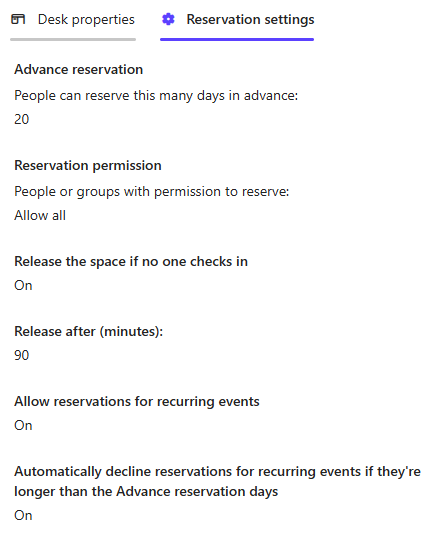
Each We've just started using Places in our office and a few users have reported recieving a desk decline email due to no check-in on the desk, despite them using the check-in button on the Places app to check-in on arrival to the office. Has anyone seen this previously? Each desk has two monitors, which I have associated with the desks in the Teams Pro Management portal to enable detection and check-in. Reservation settings for all desks are as below.130Views0likes1CommentArchitecting Microsoft 365 Environments for Multi-National Enterprises: Lessons from the Field
Introduction In today’s global economy, enterprises rely on Microsoft 365 to empower seamless collaboration across borders. However, deploying and securing multi-national M365 environments introduces complex technical, operational, and compliance challenges. With over two decades architecting cloud environments across the Americas, EMEA and APAC, I’ve led numerous deployments and migrations requiring hybrid identity resilience, data sovereignty compliance, and global operational continuity. This article presents field-tested lessons and strategic best practices to guide architects and IT leaders in designing robust, compliant, and scalable Microsoft 365 environments for multi-national operations. Key Challenges in Multi-National M365 Deployments 1. Hybrid Identity Complexity Managing synchronization between on-premises Active Directory and Azure AD becomes exponentially complex across regions. https://learn.microsoft.com/en-us/azure/active-directory/hybrid/whatis-hybrid-identity can introduce replication delays and login failures if not properly planned. Tip: Always assess latency impact on Kerberos authentication, token issuance, and Azure AD Connect synchronization cycles. 2. Data Residency and Compliance Many countries enforce strict data sovereignty laws restricting where personal and sensitive data can reside. Selecting tenant regions and enabling https://learn.microsoft.com/en-us/microsoft-365/enterprise/microsoft-365-multi-geo?view=o365-worldwide become critical to avoid compliance violations. Impact Example: A financial institution with European operations faced potential GDPR breaches until Multi-Geo was implemented to ensure Exchange Online and OneDrive data remained within EU boundaries. 3. Licensing and Cost Control Balancing E3, E5, and F3 licenses across countries with varying user roles and local currencies adds administrative and financial complexity. Best Practice: Implement https://learn.microsoft.com/en-us/azure/active-directory/enterprise-users/licensing-groups-assign, aligning assignments with security groups mapped to user personas. 4. Secure Collaboration Across Borders External sharing in SharePoint, OneDrive, and Teams federation introduces security risks if not precisely configured. Default sharing settings often exceed local compliance requirements, risking data leakage. Lesson Learned: Always validate external sharing policies against each country’s data protection laws and client contractual agreements. 5. Operational Support and SLA Alignment Global operations require support models beyond single-region business hours, demanding proactive incident response and escalation planning. Example: Implementing follow-the-sun support with regional admins trained on Microsoft 365 admin centers and PowerShell mitigates downtime risks. Strategic Solutions and Best Practices 1. Architect Hybrid Identity with Redundancy Deploy https://learn.microsoft.com/en-us/entra/identity/hybrid/connect/how-to-connect-sync-staging-server in alternate datacenters. Implement Password Hash Sync to reduce dependency on VPN and WAN availability for authentication. 2. Utilize Microsoft 365 Multi-Geo Capabilities Leverage https://learn.microsoft.com/en-us/microsoft-365/enterprise/microsoft-365-multi-geo?view=o365-worldwide to meet data residency requirements per geography. Validate licensing implications and admin configurations for each satellite location. 3. Segment Licensing by User Persona Define clear user personas (executives, knowledge workers, frontline staff). Map license types accordingly, optimizing costs while ensuring productivity needs are met. Use https://learn.microsoft.com/en-us/azure/active-directory/enterprise-users/licensing-groups-assign for scalable management. 4. Design Conditional Access Policies by Geography Create https://learn.microsoft.com/en-us/azure/active-directory/conditional-access/location-condition. Integrate with Intune compliance policies to block or limit access for non-compliant devices. 5. Implement a Global Governance Model Establish clear local vs. global admin roles to maintain accountability. Enforce https://learn.microsoft.com/en-us/azure/active-directory/privileged-identity-management/pim-configure to control and audit privileged access. Lessons Learned from the Field Latency is a silent killer – Always test Microsoft Teams and OneDrive performance across regions before production rollouts. Communication is critical – Local IT teams must align early with global security and compliance strategies. Compliance first – Never assume Microsoft’s default data location suffices for local regulations. Cost optimization is ongoing – Conduct license audits and adjust assignments every six months. Conclusion Architecting Microsoft 365 for a multi-national enterprise demands strategic integration of compliance, hybrid identity resilience, secure collaboration, and cost optimization. Cloud success in a global enterprise is not an accident – it is architected. By applying these best practices validated against Microsoft recommendations and real-world deployments, organizations can empower global collaboration without sacrificing governance or security. About the Author Gonzalo Brown Ruiz is a Senior Office 365 Engineer with over 21 years architecting secure, compliant cloud environments across North America, Latin America, EMEA and APAC. He specializes in Microsoft Purview, Entra ID, Exchange Online, eDiscovery, and enterprise cloud security.324Views0likes1Comment
schedule recurring Out of Office
Hi All I want to schedule recurring out of office every day. i have shared mailbox and i want to set out of office for shared mailbox for every email which is received from 9PM to 6AM as the users who have access to this shard mailbox works from 6AM to 9PM. Is this possible to set on exchange as OWA is disabled in my environment. Please guide me on thisSolved7KViews1like3Comments
Migrate Mailbox
Hi experts i want to migrate cloud user to exchange onprem. The cloud mailbox size is 100MB and recoverable items folder size was 2GB, i have deleted the recoverable items folder, currently its size is 110MB, in which Audit folder shows as 97MB, is it possible to delete this Audit folder size.because i cannot migrate the mailbox if it is more than 150MB size as i have restriction on my exchange onprem database to which i will migrate this mailbox, the users quota on this database is set to 150MB as restriction is set on database size.Solved1.3KViews1like2Comments
Force users to "entra register" their devices
Hi, is it possible to force user to register their devices when they log in with their company account to any other device than company owned? I tested on my private smarthphone. Logged in as normal user with company account and my device did not show up in entra as "Microsoft Entra registered" Any ideas? ThanksSolved1.4KViews0likes4Comments
Adding Proxy Addresses in AD Before Tenant-to-Tenant Migration Cutover
We're in the process of migrating users from another M365 tenant into our own, which is synced with on-prem AD. Before the cutover, we'd like to add the proxy addresses from the source tenant to our AD and have them sync to the cloud once the domain is added to our M365 tenant. Would this work as expected, or are there any potential issues to be aware of?332Views0likes2Comments
User able to send mail with account locked
Hello and Happy New Year! I tried to go through the official M365 support channels on this issue, but they were unable to help me. Environment: Local Active Directory synced to Azure/M365 via Azure AD Connect All user mailboxes reside on Exchange Online We found out, via a external security audit, that we had an user account, which was both locked and had an expired password, that was still able to send email out via the iOS Outlook app. We were under the impression that if an account was locked that they could still receive email, but not send. The account was for an employee that is no longer active and thus has been archived and deleted. We are just hoping for an explanation/root cause of this and how we can hopefully prevent it from happening in the future. Thank you, Tony Martinac AMIC189Views0likes1CommentRemove On Premises exchange Hybrid and go fully Online
Hello, I currently have a scenario where there is a Hybrid Exchange environment with 1 server. All my mailboxes have been migrated online. I would like to completely remove dependency on local AD and I do not care about AD synchronization. How do I "tell" the O365 tenant not function on it's own so that I can manage 100% from 365 Administration? I do understand that my MX and other DNS records will need to be changed. Are there any solid guides out there on decommissioning the on premise exchange server. I want to do this with the least impact on users. Thanks, Keith166KViews0likes124Comments