hyper-v
346 Topics
PS script for moving clustered VMs to another node
Windows Server 2022, Hyper-V, Failover cluster We have a Hyper-V cluster where the hosts reboot once a month. If the host being rebooted has any number of VMs running on it the reboot can take hours. I've proven this by manually moving VM roles off of the host prior to reboot and the host reboots in less than an hour, usually around 15 minutes. Does anyone know of a powershell script that will detect clustered VMs running on the host and move them to another host within the cluster? I'd rather not reinvent this if someone's already done it.130Views0likes2Comments
Unable to Build Switchless Storage using Network ATC
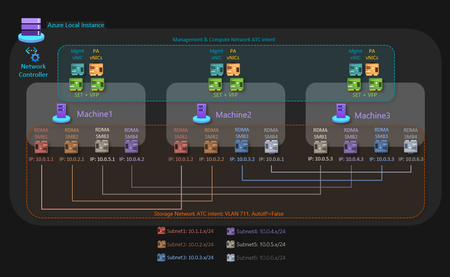
3-Node HV/S2D Cluster using Switchless Storage and Network ATC getting Network HUD Error I have a Dell 3-node server cluster being used to host Hyper-V with S2D. Each node is identical and certified to pass S2D requirements. The networking consists of 2 onboard 1 Gbps and 2 quad-port PCI(e) NICs at 10/25 Gbps. The 2 onboard ports are being used for the management intent, 2 ports from each of those NICs are being connected to 2 top-of-rack switches for the compute intent at a total of 12 10 Gbps connections, and the other 2 ports from each of those NICs are being connected directly to the other nodes in a dual mesh method for the storage intent at a total of 6 25 Gbps connections. Very similar to the Microsoft diagram for a three-node storage switchless, dual TOR, dual link deployment network reference pattern for Azure Local, but I am using Windows Server 2025 Datacenter, not Azure Local. The problem I am encountering is when I attempt to create the switchless storage intent, I get an error (shown below) that reads "Failed to fetch physical NIC mapping from the Network HUD service. Please diagnose..." If I leave off the switchless option, it builds without issue. The error only occurs when I attempt to use the switchless option. I tried without configuring the NIC IP addresses first, as well as trying configuring the NIC IP addresses beforehand. I tried without having a cluster built first, as well as building a failover cluster without storage before running the network intent command. The error I posted below shows my last attempt after having the NICs configured with IP addresses and having a failover cluster established before running the command. The error has remained the same throughout the process. Has anyone else run into an issue like this with switchless storage? It seems like everything that I am trying to do is within scope and should be a supported solution. My fallback plan is to use my existing switches, but that drops my connection speeds down from 25 Gbps to 10 Gbps due to hardware limitations.148Views0likes3Comments
Windows Server 2025 Failover Cluster Live Migration Issue
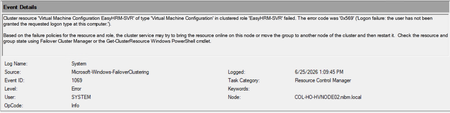
Hi Everyone, I am facing an issue in a Hyper-V Failover Cluster environment where Live Migration intermittently fails due to a service logon-related problem. The environment was previously working normally, but now whenever we attempt to Live Migrate a VM between cluster nodes, the migration fails unless we manually run “gpupdate /force” on the Hyper-V host first. After running gpupdate /force, the migration works temporarily, but the issue returns again during the next migration attempt. This makes it appear that some policy or permission is not being applied consistently on the cluster nodes. During troubleshooting, I attempted to add “NT VIRTUAL MACHINE\Virtual Machines” to the “Log on as a service” policy under Local Security Policy > Local Policies > User Rights Assignment. However, the account does not appear or resolve in the Object Picker when trying to add it manually. At this stage, I am trying to understand whether this is related to a domain GPO overwriting local policy settings, a Failover Cluster permission issue, or something specific to Hyper-V virtual machine accounts. Has anyone encountered a similar issue where Live Migration only works after running gpupdate /force? Also, is there a correct method to add “NT VIRTUAL MACHINE\Virtual Machines” to the “Log on as a service” policy, or should this permission already exist by default on Hyper-V hosts? Any guidance or recommendations would be greatly appreciated.112Views0likes1CommentPowerShell counterpart for Failover Cluster Manager "Live Migration Settings"
In Failover Cluster Manager, there's "Live Migration Settings" where I can define what cluster networks I want to carry live migration traffic. Even after some research, I cannot find a PowerShell cmdlet that lets me do the same...321Views0likes2Comments
CSV Auto-Pause on Windows Server 2025 Hyper-V Cluster
Hi everyone, i'm facing a very strange behavior with a newly created HyperV Clsuter running on Windows Server 2025. One of the two nodes keep calling for autopause on the CSV during the I/O peak. Does anyone have experienced this ? Here are the details : Environment Cluster: 2-node Failover Cluster Nodes: HV1 & HV2 (HPE ProLiant DL360 Gen11) OS: Windows Server 2025 Datacenter, Build 26100.32370 (KB5075899 installed Feb 21, 2026) Storage: HPE MSA 2070 full SSD, iSCSI point-to-point (4×25 Gbps per node, 4 MPIO paths) CSV: Single volume "Clsuter Disk 2" (~14 TB, NTFS, CSVFS_NTFS) Quorum: Disk Witness (Node and Disk Majority) Networking: 4×10 Gbps NIC Teaming for management/cluster/VMs traffic, dedicated iSCSI NICs Problem Description The cluster experiences CSV auto-pause events daily during a peak I/O period (~10:00-11:30), caused by database VMs generating ~600-800 MB/s (not that much). The auto-pause is triggered by HV2's CsvFs driver, even though HV2 hosts no VMs. All VMs run on HV1, which is the CSV coordinator/owner. Comparative Testing (Feb 23-26, 2026) Date HV2 Status Event 5120 SMB Slowdowns (1054) Auto-pause Cycles VM Impact Feb 23 Active 1 44 1 cycle (237ms recovery) None Feb 24 Active 0 8 0 None Feb 25 Drained (still in cluster) 4 ~60 (86,400,000ms max!) 3 cascade cycles Severe - all VMs affected Feb 26 Powered off 0 0 0 None Key finding: Draining HV2 does NOT prevent the issue. Only fully powering off HV2 eliminates all auto-pause events and SMB slowdowns during the I/O peak. Root Cause Analysis 1. CsvFs Driver on HV2 Maintains Persistent SMB Sessions to CSV SMB Client Connectivity log (Event 30833) on HV2 shows ~130 new SMB connections per hour to the CSV share, continuously, constant since boot: Share: \\xxxx::xxx:xxx:xxx:xxx\xxxxxxxx-...-xxxxxxx$ (HV1 cluster virtual adapter) All connections from PID 4 (System/kernel) — CsvFs driver 5,649 connections in 43.6 hours = ~130/hour Each connection has a different Session ID (not persistent) This behavior continues even when HV2 is drained 2. HV2 Opens Handles on ALL VM Files During the I/O peak on Feb 25, SMB Server Operational log (Event 1054) on HV1 showed HV2 blocking on files from every VM directory, including powered-off VMs and templates: .vmgs, .VMRS, .vmcx, .xml — VM configuration and state files .rct, .mrt — RCT/CBT tracking files Affected VMs: almost all Also affected: powered-off VMs And templates: winsrv2025-template 3. Catastrophic Block Durations On Feb 25 (HV2 drained but still in cluster): Operations blocked for 86,400,000 ms (exactly 24 hours) — handles accumulated since previous day These all expired simultaneously at 10:13:52, triggering cascade auto-pause Post-autopause: big VM freeze/lag for additional 2,324 seconds (39 minutes) On Feb 24 (HV2 active): Operations blocked for 1,150,968 ms (19 minutes) on one of the VM files Despite this extreme duration, no auto-pause was triggered that day 4. Auto-pause Trigger Mechanism HV2 Diagnostic log at auto-pause time: CsvFs Listener: CsvFsVolumeStateChangeFromIO->CsvFsVolumeStateDraining, status 0xc0000001 OnVolumeEventFromCsvFs: reported VolumeEventAutopause to node 1 Error status 0xc0000001 (STATUS_UNSUCCESSFUL) on I/O operation from HV2 CsvFsVolumeStateChangeFromIO = I/O failure triggered the auto-pause HV2 has no VMs running — this is purely CsvFs metadata/redirected access 5. SMB Connection Loss During Auto-pause SMB Client Connectivity on HV2 at auto-pause time: Event 30807: Share connection lost - "Le nom réseau a été supprimé" Event 30808: Share connection re-established What Has Been Done KB5075899 installed (Feb 21) — Maybe improved recovery from multi-cycle loop to single cycle a little, but did not prevent the auto-pause Disabled ms_server binding on iSCSI NICs (both nodes) Tuned MPIO: PathVerification Enabled, PDORemovePeriod 120, RetryCount 6, DiskTimeout 100 Drained HV2 — no effect Powered off HV2 — Completely eliminated the problem I'm currently running mad with this problem, i've deployed a lot of HyperV clusters and it's the first time i'm experiencing such a strange behavior, the only workaround i found is to take the second nodes off to be sure he is not putting locks on CSV files. The cluster is only running well with one node turned on. Why does the CsvFs driver on a non-coordinator node (HV2) maintain ~130 new SMB connections per hour to the CSV, even when it hosts no VMs and is drained?Why do these connections block for up to 24 hours during I/O peaks on the coordinator node? Why does draining the node not prevent CsvFs from accessing the CSV? Is this a known issue with the CsvFs driver in Windows Server 2025 Build 26100.32370? Are there any registry parameters to limit or disable CsvFs metadata scanning on non-coordinator nodes ? If someone sees somthing that i am missing i would be so grateful ! Have a great day.530Views0likes1Comment
Migrating from VMware to Hyper-v
Hi, I've recently deployed a new 3x node Hyper-v cluster running Windows Server 2025. I have an existing VMware cluster running exsi 7.x. What tools or approach have you guys used to migrate from VMware to Hyper-v? I can see there are many 3rd party tools available, and now the Windows Admin Center appears to also support this. Having never done this before (vmware to hyper-v) I'm not sure what the best method is, does anyone here have any experience and recommendations pls?3KViews0likes5Comments
WMI Filter for non-Hyper-V Host
I have been struggling for several days trying to set a GPO WMI Filter that would apply settings to any server, virtual or physical, as long as it is not the Hyper-V Host. It should apply to any VM on VMWare or on Hyper-V hypervisors. I found many suggestions online but none of them really work, like looking for Hypervisorpresent, that is also set to TRUE on VMs so no help. I have many ways to find and apply to an Hyper-V but EXCLUDING Hyper-Vs seems to be a tough one, the WMI filters are designed to find something and apply if it finds it, not the opposite. I have tried queries on the OptionalFeatures class, again it helps me find the Hyper-V but not EXCLUDE it. Anyone have an idea about doing this. BTW, this is to apply a setting only to non-Hyper-V and ignore if it is an Hyper-V. I am also trying to avoid blocking GPOs at a specific OU and re-linking all but 1 GPO from that level, I have to assume that there is a way to target all servers except Hyper-V. Hopefully someone has succeeded in doing the same. Thank youSolved219Views0likes3CommentsEncrypted vhdx moved to new host, boots without pin or recovery key
Hyper-V environment. Enabled VTPM on guest Server, 2022 OS and encrypted OS drive C:\ with BitLocker. Host server 2022 has physical TPM. Shut down guest OS and copied vhdx file to another Hyper-V host server that is completely off network (also server 2022 with a physical TPM). Created a new VM based on the "encrypted" vhdx. I was able to start the VM without needing a PIN or a recovery key. Doesn't this defeat the whole point of encrypting vhd's? Searching says that this should not be possible, but I replicated it twice on two different off network Hyper-V host servers. Another odd thing is that when the guest boots on the new host and you log in, the drive is NOT encrypted. So, where's the security in that? Does anyone have any ideas on this or if I'm missing something completely? Or have I just made Microsoft angry for pointing out this glaring flaw??325Views0likes3CommentsWindows Backup taking waaaaay to long
While I'm not a heavy user of these MS forums I have had to resort to them from time to time over the last 15-20 years. Yet I still can't figure out the organizational structure and it seems I can never find the right forum for my query. Almost every time my post gets moved to the correct forum or message board, or someone gives me a link directly to it. I expect it to be no different this time, and I'm perfectly fine with that. So here we go. I have Windows Server 2025 installed as a VM using MS's built-in Hyper-V on a Server 2025 computer. the VM is set up as a DC and all that stuff functions exactly as it should. However, doing the backup has suddenly gone from taking anywhere from 2 hours to a max that comes close to but has never exceeded four hours. Obviously, it depends on how much there is to actually back up. I've already gone through the troubleshooting tips to do things like checking the VSS settings and a bit of other stuff I can't exactly recall at the moment. I have an external physical 1TB usb hard drive attached to the physical computer and then it's attached as a drive to the Server 2025 VM and shows up in computer management/disk manager ad Disk 1, as it should. I have the VM set up to use this Disk 1 as the backup disk with the Windows Server Backup program. Some things I note and add here in case it matters. - The size of the VM disk for this Server 2025 VM is 500GB and the partition size of Drive C shows as 498.91GB with the remaining shown as 100MB for the EFI system partion and 1001MB for the recovery partition. - When backup starts, a new disk labeled Disk 2 appears in the disk management window on the VM and I note it's the same size as Drive C on the VM at 498.91GB. I'm wondering if this has anything to do with why my backups suddenly went from taking a max of 4 hours to as long as 20 hours to complete. Where is this virtual disk created? I looked on the VM host machine in the C:\programdata\microsoft\windows\Virtual Hard Disks directory, and it's not there. It's not on the VM machine because the virtual hard disk directory doesn't exist in that same location on the VM. THe host machine itself has a 2TB hard drive in it with 993GB of free space. Any advice or suggestions here? I have no idea why backups went from 2-4 hours to taking 20 hours or more to complete. Thanks for any help, advice or suggestions anyone can offer here. -Carl397Views0likes0CommentsNUMA Problems after In-Place Upgrade 2022 to 2025
We have updated several Hyper-V hosts with AMD Milan processors from Windows 2022 to Windows 2025 using the in-place update method. We are encountering an issue where, after starting about half of the virtual machines, the remaining ones fail to start due to a resource shortage error. The host's RAM is about 70% free. We can only get them to start by enabling the "Allow Spanning" configuration, but this reduces performance, and with so many free resources, this shouldn't be happening. Has anyone else experienced something similar? What has changed in 2025 to cause this issue? The error is: Virtual machine 'R*****2' cannot be started on this server. The virtual machine NUMA topology requirements cannot be satisfied by the server NUMA topology. Try to use the server NUMA topology, or enable NUMA spanning. (Virtual machine ID CA*****3-ED0E-4***4-A****C-E01F*********C4). Event ID: 10002 <EventRecordID>41</EventRecordID> <Correlation /> <Execution ProcessID="5524" ThreadID="8744" /> <Channel>Microsoft-Windows-Hyper-V-Compute-Admin</Channel> <Computer>HOST-JLL</Computer>825Views0likes4Comments