Forum Discussion

We've signed you in prompt - Citrix Environment without the use of roaming profiles.
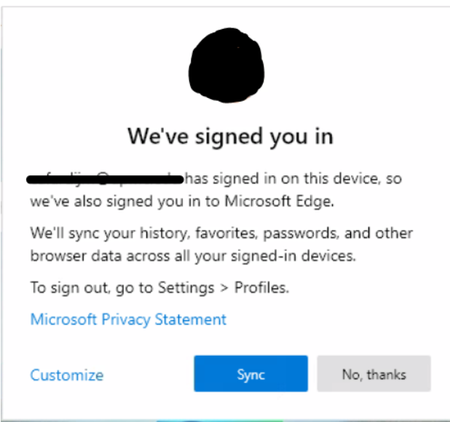

cafardijm at the moment there is NO gpo to enabled the sync (force it without user intervention).
There is a GPO to disable it. There is also a GPO to bypass the first run experience, but no auto logon if you do not enforce that (and end up with a Edge profile that the user cannot remove).
You speak about profile bloat, where? Everything that Edge does goes into AppData\Local, which is a problem to because that is a problem too, since some of the stuff is nice to roam.
AppData\Local\Microsoft\Edge can grow pretty large, up to a Gig, why do you want that kept on a Citrix server?
We have a case open with MS regarding how to reconnect to the AAD account when there is no roaming profile on a system, and we have figured out a solution.
Would you like to have this solution?
reg, Henno
 csrswalchJun 09, 2020Brass Contributor
Henno_Keers please share your solution 😉
- Henno_KeersJun 09, 2020Iron Contributor
We use VMware UEM / DEM for roaming support, but you can use regular roaming profiles aswell after modifying the standard exclusion of AppData\Local and letting parts roam.
What we roam is loosely based on:
https://www.avanite.com/blog/roaming-edge-chromium
[IncludeRegistryTrees]
HKCU\Software\Microsoft\Windows NT\CurrentVersion\TokenBroker
HKCU\Software\Microsoft\Windows\CurrentVersion\Internet Settings\Connections
HKCU\Software\Microsoft\Edge\PreferenceMACs
HKCU\Software\Microsoft\SystemCertificates
HKCU\SOFTWARE\Microsoft\Windows\CurrentVersion\CloudStore
HKCU\Software\Microsoft\IdentityCRL
HKCU\Software\Microsoft\Windows\CurrentVersion\Authentication
HKCU\Software\Microsoft\Windows\CurrentVersion\Explorer\SessionInfo
HKCU\Software\Microsoft\Windows\CurrentVersion\Security and Maintenance
HKCU\Software\Microsoft\Windows NT\CurrentVersion\HostActivityManager
HKCU\Software\Classes\Local Settings\Software\Microsoft\Windows\CurrentVersion\AppContainer\
[IncludeFolderTrees]
<LocalAppData>\Microsoft\Edge\User Data\Default\Sync Data\
<LocalAppData>\Microsoft\TokenBroker\Cache
<LocalAppData>\Microsoft\Vault
<LocalAppData>\Packages\Microsoft.AAD.BrokerPlugin_cw5n1h2txyewy
[IncludeFiles]
<LocalAppData>\Microsoft\Edge\User Data\Default\*.*
<LocalAppData>\Microsoft\Edge\User Data\*.*Important for us was that we could roam the AAD state of the user, so that it is authenticated to AAD after starting Edge again.
regards, Henno
 JonathanPitreAug 12, 2020Brass Contributor
Is there any an update regarding how to get rid of this windows on first launch ?
 Stebo_ICTMay 12, 2020Copper ContributorI would like to have that solution as we are in the same boat in our citrix 7.15 environment
Sw