Forum Discussion

URL Shortcuts not working in Edge

Hi Kelly_Y,
This does not work for me (Win 10 Enterprise 1909, MS Edge v. 87.0.664.75) but our IT team is supposedly working on it.
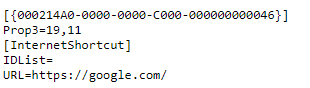
My guess is that our company links use a lot of special characters in their URLs and this somehow screws it up. Some methods that I tried worked with only simple URLs (i.e. google.com) but not with more complex ones.
The original solution in this thread seemed elegant to me but is not very lasting so what I do now is manually create shortcut on desktop with target: %windir%\explorer.exe microsoft-edge:URL.
The URL is of course substituted by some web address and this seems to work every time.

 Microsoft
mchalapetr Hi! Glad to hear you've been able to find a workaround that has been consistently working 
If you have an example of a URL with a lot of special characters that you've found does not work, I can ask the team to investigate. Or if you haven't had a chance yet, you can also submit diagnostic data through the browser that gets sent directly to the team ("..." menu > Help and feedback > Send feedback). Thanks!
-Kelly