Forum Discussion

SmartScreen turned off -> Java Webstart JNLP Files are marked as "can harm your computer"
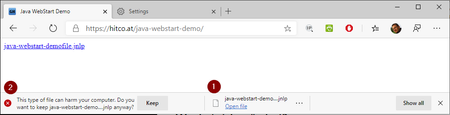
- Aug 12, 2020
Starting with Edge v85 (currently in beta) there is a new policy "ExemptDomainFileTypePairsFromFileTypeDownloadWarnings" available which solves this issue:
See Documentation:
I can confirm this works with
Edge Beta 85.0.564.30
Edge Dev 86.0.594.1
BUT be aware: The text in the documentation is correct, but the given Samples in the documentation are currently wrong!
Citing the Sample in the docs:SOFTWARE\Policies\Microsoft\Edge\ExemptDomainFileTypePairsFromFileTypeDownloadWarnings\1
= {'domains': ['https://contoso.com', 'contoso2.com'], 'file_extension': 'jnlp'}
The single quotes in the examples are wrong, only double quotes are accepted and work! So this should be corrected to:
= {"domains": ["https://contoso.com", "contoso2.com"], "file_extension": "jnlp"}To check my JNLP JavaWebStart Sample-Link https://hitco.at/java-webstart-demo/ successfully working, use following registry-Keys:
Windows Registry Editor Version 5.00

[HKEY_LOCAL_MACHINE\SOFTWARE\Policies\Microsoft\Edge\ExemptDomainFileTypePairsFromFileTypeDownloadWarnings]
"1"="{\"domains\": [\"https://*.hitco.at\", \"https://hitco.at\"], \"file_extension\": \"jnlp\"}"


Each time a user reply, reply all or Forward an email in the email pane in Dynamics 365, see below:
They get the following download message 'xyz.eml was blocked because this type of file can harm your device'.
I have made the changed to the settings as per your post, but that has made no difference. See the screenshot below for the edge://policy/
I can reproduce the same problem on Chrome too.
Thanks

It looks ok, i just removed the Domain from the screenshot. I also was in touch with Dell and asked them why Dell iDRAC 8 would work with this workaround and Dell iDrac 9 would not. They said it relies on the browser and as it works with 8 everything would be fine from their side. Since it only checks for the ending...
So there must be something wrong with Edge...
Support wouldn´t escalate it further up the chain.
Only difference i can see ist that the urls look diffrent:
DRAC 8 https://FQDN/index.html
DRAC 9 https://FQDN/restgui/index.html
The one with red x is the DRAC 9 and the other one DRAC 8
And in the file explorer you see the temporary file, when i select keep it works but shouldn´t it work in both since it checks domain and filextension only?
- Gunnar-HaslingerNov 22, 2022Iron Contributor
HowonChoi I have no Idea what you like to tell or ask. Using edge://policy to view your current settings offers no GUI to change the according Registry-Keys directly in Edge. Use MDM, GroupPolicies or directly edit the Registry-Keys according to your needs / Management-System.
You find the Policy Reference here:
https://learn.microsoft.com/en-us/deployedge/microsoft-edge-policies  HowonChoiNov 22, 2022Copper Contributor
Gunnar-Haslinger edge://policy/ 에서 AutoOpenFileTypes 와 AutoOpenAllowedForURLs Policy 수정이 가능한가요?
- Gunnar-HaslingerAug 19, 2021Iron Contributor
KamranB that's possible using the AutoOpenFileTypes and AutoOpenAllowedForURLs Policy.
 KamranBAug 19, 2021Copper Contributor
Has anyone got these files to open automatically rather than having to download/save/open?
- PeDeJul 21, 2021Brass Contributor
- Gunnar-HaslingerJul 20, 2021Iron Contributor
PeDe You show us a Problem with JNLP (Java WebStart Files) but give us Links to html-Files, so that are not the URLs of the jnlp files but just html-File Links. Have a Look at the REAL URL of the jnlp Files and not the html-File which probably contains code to download jnlp
DRAC 8 https://FQDN/index.html
DRAC 9 https://FQDN/restgui/index.html