Forum Discussion

GPO RestoreOnStartup not working - shows edge://apps/
 Jan 20, 2020
Problem seems to be solved.
Deleted whole GPO object, created a new one and set setting after setting - following "gpupdate /force" and reloading policies in Edge.
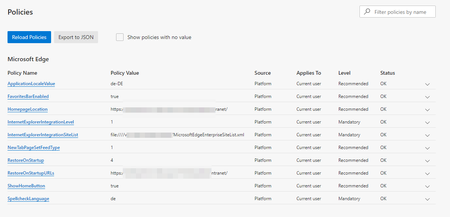
In the end I had the same settings as on the screenshot above - but this time startup page worked.

How is this PC managed? AD-joined or MDM?
This issue occures on all PCs with Edge since creation of the GPO Policy.
Before the users could use Edge with their custom start page.
All machines are Win 10 1809 and Active Directory members. No MDM is used for them.
It occures on all Versions of Edge - DEV, BETA and the brand new Stable build (from https://www.microsoft.com/en-us/edge/business/download).
As seen in the screenshot of edge://policy there aren't many policies set.
I thought someone else should have this issue as well, as it occures on any machine/user in our environment.
Is there anything you would think I could test to get the cause of this issue?