Forum Discussion

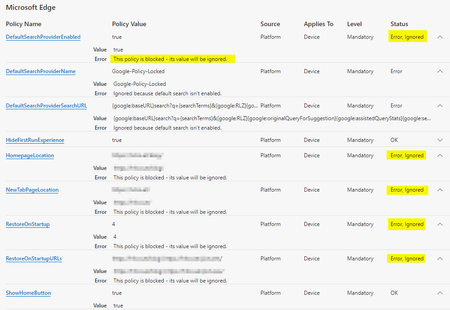
Bug: Windows 10 Pro Education: This policy is blocked - its value will be ignored
- Nov 13, 2020
Gunnar-Haslinger thank you for the report! Kelly got in touch and I was able to setup and reproduce the problem. You are correct in that we were incorrectly categorizing the Professional Education edition which resulted the "sensitive" policies always getting filtered out.
I have a fix ready that we will get in as soon as we can.


I like to re-open this issue, because the same problem occurs with "Windows 10 Pro for Workstations".
I just re-tested following three browser Versions:
- Edge v91.0.864.41 (Stable)
- Edge v92.0.902.9 (Beta)
- Edge v93.0.910.5 (Dev)
On todays most actual Win10-OS Version: Win10 v21H1 Build 19043.1052
I tested following Windows 10 Editions (SKUs / KMS Keys see https://docs.microsoft.com/en-us/windows-server/get-started/kmsclientkeys)
Windows 10 Enterprise: OK
Windows 10 Pro: OK
Windows 10 Pro for Workstations: ERROR!
Windows 10 Pro Education: OK
Windows 10 Education: OK
"OK" means my Policy shows no Errors, all "Status" Fields are OK.
"Error" means following result: "Error, Ignored - This policy is blocked - its value will be ignored."
All Policies which are documented as "This policy is available only on Windows instances that are joined to a Microsoft Active Directory domain or Windows 10 Pro or Enterprise instances enrolled for device management." do not work on "Windows 10 Pro for Workstations" Edition of Windows 10. All other Policies still work as expected, but Policies like HomepageLocation, DefaultSearchProvider, RestoreOnStartUpURLs etc... which need an MDM-Enrolled or AD-Joined Device don't work in my MDM-registerd Policy-Setup.
Ping Kelly_Y : seems mkruger is currently not active in the techcommunity. May I please ask you to forward my previous post in this thread to somebody who can fix this?
- mkrugerApr 19, 2022
Microsoft
Looks like Pro N may be miss categorized here. - Gunnar-HaslingerApr 18, 2022Steel Contributormkruger I got messages that "Windows 10 Pro N in Windows 10 Pro x64 21H2 February 2022 install.wim" seems to be not recognized as valid SKU. I haven't tested myself yet - but maybe you can check this?
- mkrugerApr 01, 2022
Gunnar-Haslinger we got word of IoT Enterprise LTSC not working and made a fix in February 2022. This SKU should be identified as an enterprise SKU and sensitive policies working in version 100 (100.0.1185 specifically). This is currently in beta but soon to be stable.
IoT Enterprise is a bit of a tricky SKU to get and test. It is a virtual SKU, where you need a specific product key that is applied to the professional SKU to migrate the SKU to IoT Enterprise. I was never able to track down a VHD or ISO for it.
- Gunnar-HaslingerApr 01, 2022Steel Contributormkruger I got messages that "Windows 10 IoT Enterprise LTSC 2021 21H2" seems to be not recognized as valid SKU. I haven't tested myself as I have no access to this Release - but maybe you can check this?
 Rene-vsDec 06, 2021Copper ContributorI have this problemen with Azure Virtual Desktop.
Azure Virtual Desktop is running "Windows 10 Enterprise multi-session" SKU
Tested with Edge 96.0.1054.43 stable and edge 97.0.1072.21 beta both don't work .- Gunnar-HaslingerJun 25, 2021Steel Contributor
Thanks mkruger for fixing this issue.
I just tested with Edge Canary Version 93.0.932.0 on Windows 10 Pro for Workstations (20H1) and I can confirm it works now as expected with the "Pro for Workstations" SKU.I guess pieterdezwart gives you a "like" too 🙂
Thanks Kelly_Y for notifying the team.
- mkrugerJun 22, 2021
Windows 10 Pro for Workstations should be properly identified starting in version 93.0.930.0.
Give it a try when that version makes it to Canary/Dev/Beta and let us know if there are further problems.
- mkrugerJun 15, 2021
I am not as active as I'd like to be, but try to drop in from time to time!
I will work to get Windows 10 Pro for Workstation properly identified in Edge.
- Kelly_YJun 15, 2021
