Forum Discussion

Very Impressive Edge insider Canary Results in HTML5 Test (Plus other browsers) Comparison
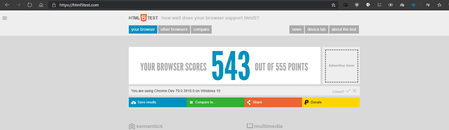

no idea really, are you even using the same Windows 10 version?
for reference I have these flags enabled, most of them are flags that shouldn't have any effect on the score because they are about the UI and Edge-exclusive features.
Anonymize local IPs exposed by WebRTC.
Conceal local IP addresses with mDNS hostnames. – Mac, Windows
#enable-webrtc-hide-local-ips-with-mdnsExperimental Web Platform features
Enables experimental Web Platform features that are in development. – Mac, Windows
#enable-experimental-web-platform-featuresOmnibox rich entity suggestions
Display entity suggestions using images and an enhanced layout; showing more context and descriptive text about the entity. – Mac, Windows
#omnibox-rich-entity-suggestionsOmnibox UI Max Autocomplete Matches
Changes the maximum number of autocomplete matches displayed in the Omnibox UI. – Mac, Windows
#omnibox-ui-max-autocomplete-matchesTab Groups
Allows users to organize tabs into visually distinct groups, e.g. to separate tabs associated with different tasks. – Mac, Windows
#tab-groupsParallel downloading
Enable parallel downloading to accelerate download speed. – Mac, Windows
#enable-parallel-downloadingTab Hover Cards
Enables a popup containing tab information to be visible when hovering over a tab. This will replace tooltips for tabs. – Mac, Windows
#tab-hover-cardsExperimental Productivity Features
Enable support for experimental developer productivity features, such as built-in modules and policies for avoiding slow rendering. – Mac, Windows
#enable-experimental-productivity-featuresShow block option in autoplay settings
If enabled, block will appear as an option in media autoplay settings. – Mac, Windows
#edge-autoplay-user-setting-block-optionExperimental Collections feature
Enable content collection pane and background entity extraction to support web content collection and organization scenarios. Warning: This is an early experimental feature. Content will not be synced and may be lost. – Mac, Windows
#edge-collectionsEnable Fullscreen Dropdown
Drops down browser frame during browser fullscreen. – Windows
#edge-enable-shy-uiEnable Secondary EE for Images that are dragged to Collections.
Allows users to have a richer experience when dragging images into collections that are linked to product pages that are supported by Advanced Entity Extraction. – Mac, Windows
#edge-ee-secondary-for-image-drag-dropEnable showing the spinner on the Collections site card while loading
This flag will enable the code to show the spinner on a site card whenadded to Collections when the site is still loading or when advancedentity extraction is otherwise pending. – Mac, Windows
#edge-ee-spinner-on-site-cardExperimental Tracking Prevention Features
Enables upcoming and experimental improvements to Tracking Prevention. – Mac, Windows
#edge-experimental-tracking-prevention-featuresGrammar Tools in Reading View
Enable Grammar Tools feature in Reading View – Mac, Windows
#edge-reading-view-grammar-toolsEnable Text Highlights for PDF
Enables creation and modification of Text Highlights for PDF. – Mac, Windows
#edge-pdf-highlightGlobal Media Controls
Enables the Global Media Controls UI in the toolbar. – Mac, Windows
#global-media-controlsSecure DNS lookups
Enables DNS over HTTPS. When this feature is enabled, your browser may try to use a secure HTTPS connection to look up the addresses of websites and other web resources. – Mac, Windows
#dns-over-https
OT: is there a way to find out if the default state correspons to enabled or disabled?
- HotCakeXNov 28, 2019MVPI wish, asked for it many times in posts but still nope, can't tell what default is exactly