Forum Discussion

Maan2003
Jan 04, 2020Iron Contributor
Try my new extension
NTP and Command Extension for Edge The default NTP of Edge only show upto eight tiles and a tiny favorite bar on the top. This left most of the space on New Tab useless. I developed an extension to ...
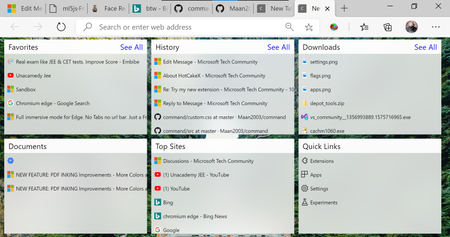

StephenJeffreyWhite
Jan 04, 2020Brass Contributor
Really looking forward to it then. Let me know when it is up on github.

Maan2003
Jan 05, 2020Iron Contributor
StephenJeffreyWhite Tab bar is on Github
https://github.com/Maan2003/tabbar
- StephenJeffreyWhiteJan 31, 2020Brass ContributorMaan2003 Are you still working on this? I liked what you had so far with the omnibox and the new tab page.
- HotCakeXJan 12, 2020MVPBtw the reason I said to make the items and icons a bit bigger is because they look small on my screen (1080p 100% scaling) but they look big on your screen, i think because if i remember correctly, you are using a much higher scaling in your Windows settings.
- HotCakeXJan 12, 2020MVPNice good job, this looks a lot better now 🙂
- could you also add a nice mouse hover effect to the items on each column?
- increase the transparency of the columns background and make them more blurry
- change only the color of the title Bars of each column (downloads, top sites etc), only the rectangle. once you done it, I think you need to change the font color of the column titles too to make them easily readable.
- make all of the items and their icons (together) a little bit bigger. ideally, as big as the items shown on the favorite bar.
Can't wait to see how it will look like after applying all of the above, and thank you 🙂 - Maan2003Jan 12, 2020Iron Contributor
HotCakeX Check this one out.
On github https://github.com/Maan2003/command
what's new:
1. Favicons
2. All blocks made symmetrical.
3. Can show on top of any page(expect edge:// urls) with Alt +X shortcut.
4. "."<space> has replace "cmd"<space> in omnibox.
5. keyboard navigation with tab and arrow keys
- StephenJeffreyWhiteJan 10, 2020Brass ContributorAwesome news, looking forward to when the image of the day is in there. I'll try it out after you get that in there.
- HotCakeXJan 10, 2020MVPGood stuff,
I think you should add thumbnails and icons to each item in that NTP too.
downloads section should show a small thumbnail of the downloaded file or a nice placeholder if it's not possible for a specific file.
favorites/history/topsites/quick links should all show the website's favicon.
documents should show the correct icon too, PDF/Docs/Txt etc
also see if you can set all of the columns to have the same size (width and height), i'm sure it will look better
so like 6 symmetrical columns or rows next to each other.
the ideal thing would be to have a menu like Windows 10 start menu or Google play's menu on their website.
this website also has some nice free inspirational projects
https://tympanus.net/codrops/ - HotCakeXJan 05, 2020MVPHmm okay that's sad, because we have to wait for Microsoft to implement features we want..and it takes so much time
- Maan2003Jan 05, 2020Iron ContributorYes,the tabs thumbnials of edge:// urls are not allowed
- HotCakeXJan 05, 2020MVPAh, so many limitations imposed to Chromium extensions, right?
- Maan2003Jan 05, 2020Iron Contributor
As far I know an extension can't make change to the browser UI.
and I can sort the tabs according to there position in the window but I can't make them appear under the tabs.
and I have to design an extension that was the default icon I got the chrome extension docs.
- HotCakeXJan 05, 2020MVPIt looks good, there are minor UI problems
- mouse cursor, when I hover over the "start fresh" and "new tab" buttons, turns into text cursor.
- The extension icon could also be changed to something better.
- the background could change according to Edge theme, dark/light. currently it's only white.
by the way,
can you make those tab previews to appear under each tab?
also can you make an extension that modifies Edge UI? like make it transparent?
ambitious suggestions, i know 🙂 - Maan2003Jan 05, 2020Iron Contributormy bad I forgot to upload icon.png. Now I have uploaded it. Just download it again from github and load the src folder.
- HotCakeXJan 05, 2020MVPI'm getting these errors when choosing different directories to load as unpacked extension in Edge canary Version 81.0.381.0 (Official build) canary (64-bit)
ErrorManifest file is missing or unreadable when choosing "\tabbar-master" folder
ErrorCouldn't load icon icon.png for browser action. when choosing "\tabbar-master\tabbar-master\src" folder
