Forum Discussion

Jerffelly
Jul 12, 2021Copper Contributor
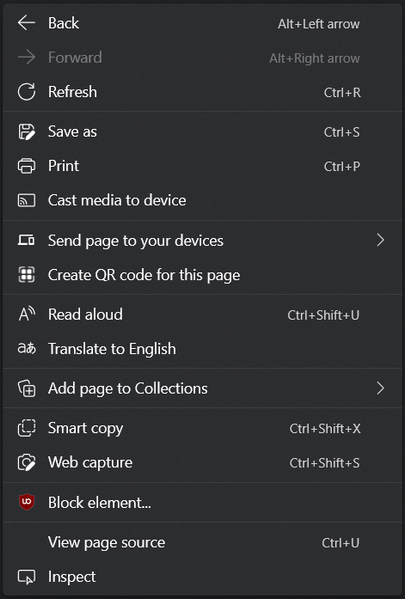
Improvements to the context menu.
As updates goes by, the edge context menu is starting to become bigger and bigger. I think there should be a settings page for the context menu, where you can enable or disable options for...

dftf-wip
Jul 14, 2021Iron Contributor
Jerffelly Yeah, I've also suggested this before on here.
I'd like the right-click menu to be something like this:
Compared to the menu in your screenshot, here's the changes:
- Back, Forward and Refresh share one row, similar to Firefox's menu
- Options for Close tab and Reopen closed tab could be added
- Cast media to device: my current laptop is not capable of connecting to external displays wirelessly, so it's pointless me seeing this
- Send page to your devices: all my devices are treated as standalone, not networked
- Create QR code for this page: useful, sure, but I doubt the vast-majority of Edge users will have a need for this regularly (if at-all). And you can already click in the Address Bar to reveal the icon for it anyway
- Add page to Collections: I don't use the Collections feature, so have no-need for this. I've said before on here it would make-sense to only show this option after a user has created at-least one Collection first
- View page source and Inspect: I've no-idea why the Edge team continue to feel that the vast-majority of their users are Web Devs, who understand HTML, CSS, JavaScript and so-on... it's just one of those settings a typical end-user will accidentally click on then panic when something unfamiliar opens-up on the right. They really should add a setting to hide both these items, and have that setting on-by-default