Forum Discussion

Norphus
Mar 20, 2020Copper Contributor
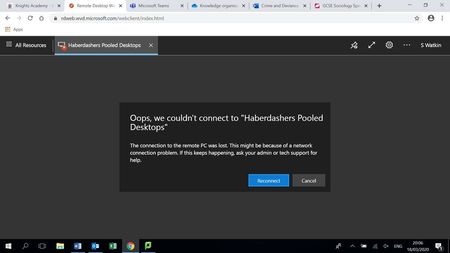
Error when connecting to MVD - 0x3000047
I have recently deployed WVD thanks to the current global crisis. It is working well for most of our users, apart from one. When she tries to connect to WVD via the web client, she gets this: ...
- Mar 24, 2020
serge I think you are on the right track. Here's what we see internally:
Client gets an Error during Orchestration.
Orchestration failed. Code=0x80075a1e, symbolicCode: E_PROXY_ORCHESTRATION_UNKNOWN_ERROR, message: Failed to add user = ≤USERNAME REMOVED≥ to group = Remote Desktop Users. Reason: Win32.ERROR_NO_SUCH_MEMBER, target: (null):4


jjensen1818
Jun 09, 2020Copper Contributor
Apparently there is a bug.
https://techcommunity.microsoft.com/t5/windows-virtual-desktop/investigating-issue-with-windows-10-enterprise-multi-session/m-p/1431813
You can fix it by running this registry add
Windows Registry Editor Version 5.00
[HKEY_LOCAL_MACHINE\SYSTEM\CurrentControlSet\Control\Terminal Server\WinStations\rdp-sxs]
"fReverseConnectMode"=dword:00000001
I did it by running the powershell command on the VM directly in Azure.
New-ItemProperty -Path "HKLM:\SYSTEM\CurrentControlSet\Control\Terminal Server\WinStations\rdp-sxs" -Name "fReverseConnectMode" -Value "1" -PropertyType "Dword"
After a reboot it works!
Regards
Jacob
https://techcommunity.microsoft.com/t5/windows-virtual-desktop/investigating-issue-with-windows-10-enterprise-multi-session/m-p/1431813
You can fix it by running this registry add
Windows Registry Editor Version 5.00
[HKEY_LOCAL_MACHINE\SYSTEM\CurrentControlSet\Control\Terminal Server\WinStations\rdp-sxs]
"fReverseConnectMode"=dword:00000001
I did it by running the powershell command on the VM directly in Azure.
New-ItemProperty -Path "HKLM:\SYSTEM\CurrentControlSet\Control\Terminal Server\WinStations\rdp-sxs" -Name "fReverseConnectMode" -Value "1" -PropertyType "Dword"
After a reboot it works!
Regards
Jacob

PatBrodeur
Jul 04, 2020Copper Contributor
jjensen1818 Bingo! That is the bug I had and the registry key just fixed it! I spent few hours on this. Thank you again!