Forum Discussion

PyungraeCho Microsoft
Sep 01, 2021MicrosoftAuto Deallocation for Unused Azure Virtual Desktop Personal VMs
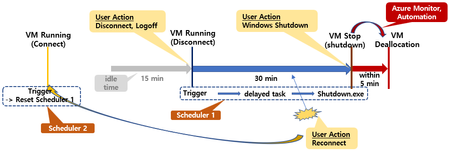
Auto-Deallocation method for Azure Virtual Desktop VM that has not been used for a specific period has been introduced in various places. I would like to introduce another scenario. But this is suita...

jlou65535
Aug 22, 2023MCT
Yes, you have to take care.
Because my env is personal AVD VMs, I decided to change it by the new feature for AVD Auto-scaling : https://jlou.eu/avd-solo-start-and-stop/
Because my env is personal AVD VMs, I decided to change it by the new feature for AVD Auto-scaling : https://jlou.eu/avd-solo-start-and-stop/

AIDADelios
Apr 05, 2024Copper Contributor
jlou65535 Hello,
I've configured an scaling plan for my personal pool but never shutdown the virtual machines.
I had followed your link https://jlou.eu/avd-solo-start-and-stop/ but machines never shutdown.
I have an AVD personal pool wit 10 VMs. I've create a scaling plan and associated to the pool.
My scaling's plan configuration is:
- Ram-up --> 07:00 AM, start vm on connect active. Don't turn VMs on at start time. Disconnect setting and log og settings in shutdownn 0 minutes.
- Peak hours --> 08:00 AM, start vm on connect active. Disconnect setting and log og settings in shutdown 0 minutes.
- Ramp-down --> 03:00 PM, start vm on connect active. Disconnect setting and log og settings in shutdown 0 minutes.
- Off.peak hours --> 03:30 PM, start vm on connect active. Disconnect setting and log og settings in shutdown 0 minutes.
Whether I disconnect the user session or close the windows avd client the VMs never shutdown and put in the deallocated state.
How can I fix it? .
Thanks in advance.
- jlou65535Apr 05, 2024MCTHello,
Did you configure the RBAC role named "Desktop Virtualization Power On Off Contributor" for Azure Virtual Desktop app ?
Best,
JL- AIDADeliosApr 05, 2024Copper Contributor
Yess, but doesn't work. Machines keeps alive.
- jlou65535Apr 05, 2024MCTCould you please double check the AVD application ID ? (9cdead84-a844-4324-93f2-b2e6bb768d07)
For each schedule phase, could you please try with :
- Disconnect settings - When disconnected for (min) : 10 minutes
- Log off settings - When logged off for (min) : 5 minutes
In a AVD virtual machine activity log, could you see any "Deallocate Virtual Machine" succeeded or failed operations ?
Best,
JL