Generate flat-file XSD schemas at runtime from sample delimited or fixed-width files- now available in preview in Azure Logic Apps Standard.
We’re excited to announce the preview of Flat File Schema Generation for Azure Logic Apps Standard. This new built-in action helps integration teams move faster by generating BizTalk compatible flat-file XSD schemas directly from sample flat-file payloads, reducing the manual effort required to model CSV, delimited, and positional files before encoding or decoding them in workflows.
Why this matters
Flat files continue to power enterprise mission critical integrations, from partner feeds and batch exports to finance ledgers, operational reports, and legacy system exchanges. While Azure Logic Apps already helps teams encode and decode flat files, creating the required flat-file schema has often been a separate design-time step. With Flat File Schema Generation, you can now accelerate that onboarding experience by generating a starter schema from real sample data within the workflow itself.
What’s new
The new Flat File Schema Generation action generates a flat-file XSD schema from sample content that you pass into the action. The generated schema includes BizTalk-compatible flat-file annotations, making it suitable for downstream Flat File Encoding and Flat File Decoding actions in Azure Logic Apps Standard workflows.
- Runtime schema generation: Generate schemas directly from sample flat-file payloads in the workflow.
- Delimited and positional support: Create schemas for common CSV, semicolon-delimited, tab-delimited, and fixed-width files.
- BizTalk-compatible annotations: Use generated schemas with the existing flat-file processing model familiar to BizTalk and enterprise integration teams.
- Flexible naming: Configure root element names, namespaces, record names, delimiters, and field positions to match your integration needs.
How it works
You provide a representative sample payload, specify whether the file structure is delimited or positional, and configure the relevant parsing details such as field delimiters, record delimiters, header handling, or fixed-width field positions. Once you run the workflow, the action returns the generated XSD schema as XML output, which can then be passed into subsequent flat-file operations or stored as part of your onboarding flow.
Get started
To try the preview, add the Flat File Schema Generation action to a Logic Apps Standard workflow, provide a sample flat-file payload, choose the record structure, and configure the field or record settings that match your format. Use the generated schema output with Flat File Decoding or Encoding in the same workflow or incorporate it into your broader onboarding process for flat-file integrations.
Reference document: Encode, Decode, or Generate Schemas for Flat Files - Azure Logic Apps | Microsoft Learn.
A walkthrough of generating a flat-file schema from sample data
Use the following walkthrough to try the preview end to end with a simple customer order file. The same pattern can be adapted for semicolon-delimited, tab-delimited, or fixed-width positional files.
Delimited sample:
For this example, assume a trading partner sends a comma-separated order file with a header row and repeating order records.
Sample file:
OrderId,CustomerName,OrderDate,Amount,Region
10001,Contoso Retail,2026-07-01,1250.75,North
10002,Fabrikam Foods,2026-07-02,890.00,West
10003,Northwind Traders,2026-07-03,2400.50,South
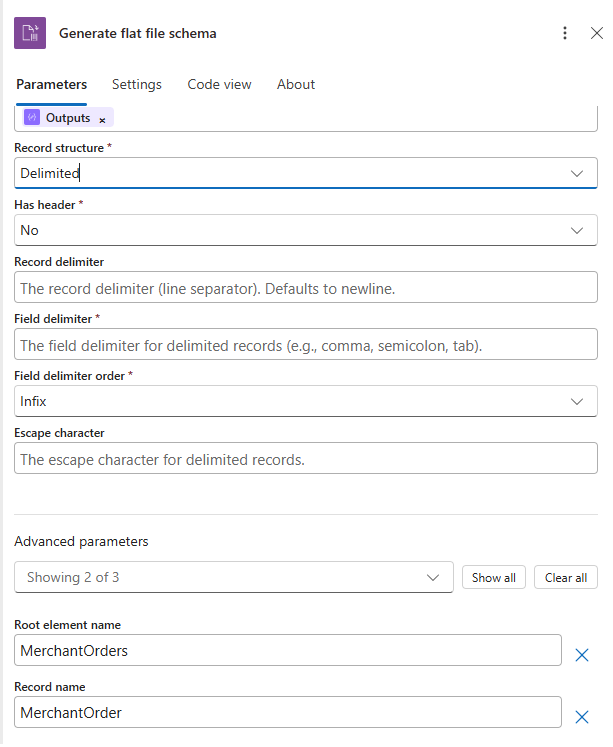
Configuration values
|
Parameter |
Example value |
|
Record Structure |
Delimited |
|
Has header |
Yes |
|
Record delimiter |
newline |
|
Field delimiter |
, |
|
Field delimiter order |
Infix |
|
Escape character |
Double quote, if the source file uses quoted values |
|
Root element name (Advanced Parameters) |
Orders |
|
Record name (Advanced Parameters) |
Order |
|
Target namespace (Advanced Parameters) |
http://schemas.contoso.com/orders |
- In the Azure portal, open your Logic Apps Standard resource and select the workflow where you want to generate the schema.
- Add a trigger, such as When an HTTP request is received, or use any trigger/action that provides the sample flat-file content.
- Add a new action and search for Flat File.
- Select the Flat File Schema Generation action.
- In the action, provide the sample flat-file content.
- Select the file structure type. For this example, choose Delimited.
- Enter the schema metadata under advanced parameters, such as the root element name, record name, and target namespace.
- Configure the delimiter settings, including the field delimiter and record delimiter.
- If the first row contains column names, enable the option to use the first row as headers.
- Save and run the workflow.
- Open the workflow run history and review the action output. The action returns a generated XSD schema with flat-file annotations.
- Review the generated schema, validate field names and inferred data types, and use the schema with Flat File Decoding or Flat File Encoding in your workflow.
Positional sample: Fixed-width customer order file
Use this example when the source flat file doesn’t use delimiters. In a positional, or fixed-width, file each field starts and ends at a known character position. The schema generation action needs those field positions so it can split each record correctly.
Sample positional file:
10001CONTOSO00120260701000125075NORTH
10002FABRIKAM0120260702000089000WEST·
10003NORTHWIND120260703000240050SOUTH
Note: The dot symbol in the second record represents a trailing space used for fixed-width padding. Replace it with an actual space in your real sample payload.
Field position map
|
Field |
Start position |
Length |
Justification |
Example value |
|
OrderId |
1 |
5 |
Right |
10001 |
|
CustomerCode |
6 |
10 |
Left |
CONTOSO001 |
|
OrderDate |
16 |
8 |
Right |
20260701 |
|
Amount |
24 |
9 |
Right |
000125075 |
|
Region |
33 |
5 |
Left |
NORTH |
Configuration values for the positional sample
|
Parameter |
Example value |
|
Record Structure |
Positional |
|
Has Header |
No |
|
Record delimiter |
newline |
|
Field positions |
Use the field names, lengths, and justification values from the field position map. |
|
Root element name (Advanced Parameters) |
Orders |
|
Record name (Advanced Parameters) |
Order |
|
Target namespace (Advanced Parameters) |
http://schemas.contoso.com/orders/positional |
Step-by-step walkthrough for positional files
- In the Azure portal, open your Logic Apps Standard resource and select the workflow where you want to generate the schema.
- Add a trigger, such as When an HTTP request is received, or use an existing action that provides the fixed-width file content.
- Add a new action and search for Flat File.
- Select the Flat File Schema Generation action.
- Paste the positional sample payload into the sample content input. Make sure every record has the same total length.
- For the structure type, choose Positional.
- Enter the schema metadata, including root element name, record name, and target namespace.
- Configure the record delimiter. For this example, use newline.
- Add the field positions in order: OrderId length 5, CustomerCode length 10, OrderDate length 8, Amount length 9, and Region length 5.
- Set justification for each field. Use Right for numeric or date-like fields and Left for text fields that may contain trailing space padding.
- Save and run the workflow.
- Open the workflow run history and review the generated XSD schema output. Confirm that the field names, order, lengths, and positional annotations match the source record layout.
- Use the generated schema with Flat File Decoding to parse incoming fixed-width files into XML, or with Flat File Encoding to generate outbound fixed-width files.
Limitations and known issues
|
Limitation |
Description |
|
Type inference uses a single record. |
The first non-empty data record determines column types. |
|
Single record type only |
The action generates one repeating record structure and doesn't support heterogeneous record layouts. |
|
No nested or hierarchical records |
The generated schema is flat, meaning you have a root element with one repeating child record and fields. |
|
Positional boundaries aren't automatically detected. |
You must provide exact field lengths in field Positions. |
|
UTF-8 code page only |
Generated schema sets codepage="65001" and doesn't expose encoding selection. |
|
Escape-character behavior is literal. |
Escape handling matches literal value and skips only the next single character. |
|
recordName default |
If unspecified, defaults to {RootElementName}_Record. |
|
Designer justification input |
fieldPositions[].justification supports only Left and Right. |
Looking ahead
This preview is another step toward making Azure Logic Apps Standard, a more complete and productive platform for enterprise integration modernization. Whether you are onboarding new partner feeds, modernizing BizTalk-style flat-file processing, or automating recurring operational files, Flat File Schema Generation helps reduce setup friction and get integration workflows moving faster.

 Microsoft