Forum Discussion

-- Microsoft Azure Storage Explorer || Private Endpoints on ADLS Gen2 --
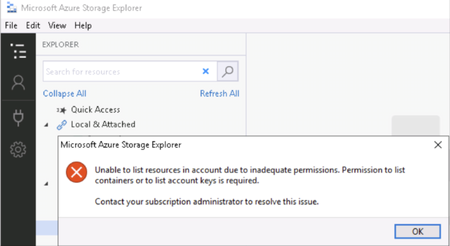
- Apr 20, 2020
I just understood and solved my issue, was all about DNS resolution, adding below some explanation.
The need:
End users need to connect to PaaS services from home through VPN or from On-Premises private networks through their https://docs.microsoft.com/en-us/azure/private-link/private-endpoint-overview#dns-configuration IPs.
Overview of the solution:
Forward DNS request to a DNS VM proxy located on Azure.
The DNS VM proxy is in a vnet that has a link with your Azure private DNS zones hosting the https://docs.microsoft.com/en-us/azure/private-link/private-endpoint-overview#dns-configuration.
Detail of the solution:
- Create the Azure https://docs.microsoft.com/en-us/azure/dns/private-dns-overview “privatelink.blob.core.windows.net” with the DNS A record “mystoragename.privatelink.blob.core.windows.net” that returns the IP of my Storage Account private endpoint’s IP.
- Use a VM DNS proxy, this VM’s vNet is linked to the upper mentioned Azure private dns zone. This DNS VM forwards DNS request to Azure DNS IP https://docs.microsoft.com/en-us/azure/virtual-network/what-is-ip-address-168-63-129-16.
- Here, a solution could be to use https://azure.microsoft.com/en-us/services/active-directory-ds/ as the DNS proxy, it’s natively configured to forward dns request to 168.63.129.16.
- Use a DNS conditional forwarder on the On-Premises DNS servers to forward dns requests for the DNS zone “mystoragename.blob.core.windows.net” to the DNS proxy on Azure (in my context, to the 2 private Ips of my Azure AD DS service).
Feature request:
A feature request has been published https://feedback.azure.com/forums/34192--general-feedback/suggestions/39697135-simplify-private-endpoint-dns-resolution-from-on-p to simplify Private Endpoint DNS resolution from On-Premises.

 Microsoft
Jamesdld Did you validate whether access through the Azure Portal Storage Explorer works in either case? (browsing from a machine on the same VNET as the private endpoint). Also notice that your errors on Test 1 and Test 2 are different - check the last part of this article (although it is written for Databricks/Spark) as well around reviewing ADLS ACLs : https://deep.data.blog/category/azure-data-lake-storage-gen-2/

Hi Roy,
I just did the test from a VM located in the same vnet than my private endpoints, the result is exactly the same.
James
- JamesdldApr 20, 2020Brass Contributor
I just understood and solved my issue, was all about DNS resolution, adding below some explanation.
The need:
End users need to connect to PaaS services from home through VPN or from On-Premises private networks through their https://docs.microsoft.com/en-us/azure/private-link/private-endpoint-overview#dns-configuration IPs.
Overview of the solution:
Forward DNS request to a DNS VM proxy located on Azure.
The DNS VM proxy is in a vnet that has a link with your Azure private DNS zones hosting the https://docs.microsoft.com/en-us/azure/private-link/private-endpoint-overview#dns-configuration.
Detail of the solution:
- Create the Azure https://docs.microsoft.com/en-us/azure/dns/private-dns-overview “privatelink.blob.core.windows.net” with the DNS A record “mystoragename.privatelink.blob.core.windows.net” that returns the IP of my Storage Account private endpoint’s IP.
- Use a VM DNS proxy, this VM’s vNet is linked to the upper mentioned Azure private dns zone. This DNS VM forwards DNS request to Azure DNS IP https://docs.microsoft.com/en-us/azure/virtual-network/what-is-ip-address-168-63-129-16.
- Here, a solution could be to use https://azure.microsoft.com/en-us/services/active-directory-ds/ as the DNS proxy, it’s natively configured to forward dns request to 168.63.129.16.
- Use a DNS conditional forwarder on the On-Premises DNS servers to forward dns requests for the DNS zone “mystoragename.blob.core.windows.net” to the DNS proxy on Azure (in my context, to the 2 private Ips of my Azure AD DS service).
Feature request:
A feature request has been published https://feedback.azure.com/forums/34192--general-feedback/suggestions/39697135-simplify-private-endpoint-dns-resolution-from-on-p to simplify Private Endpoint DNS resolution from On-Premises.
- JamesdldApr 18, 2020Brass Contributor
Using a DNS forwarder VM could be a solution but I would have preferred a solution with my current infra services. url: https://github.com/Azure/azure-quickstart-templates/tree/master/301-dns-forwarder/
There is here an interesting feature request : "Simplify Private Endpoint DNS resolution from on-premises". url: https://feedback.azure.com/forums/34192--general-feedback/suggestions/39697135-simplify-private-endpoint-dns-resolution-from-on-p - JamesdldApr 18, 2020Brass Contributor
I am still investigating here for info, my privatelink dns zone is hosted on On-Premises dns servers because my client are in my On-Premises network, I will dig this area, maybe its a ttl misconfiguration or something like that...
- JamesdldApr 18, 2020Brass Contributor
I just ended a call with Garrett Curtin from Microsoft Storage support team (ticket id 120041722000372) and unfortunately "Storage Explorer" doesn’t support using privatelink dns zones as recommended https://docs.microsoft.com/en-us/azure/private-link/private-endpoint-overview#dns-configuration. The workaround is to overwrite the public dns record like "mysa.blob.core.windows.net" and not the privatelink one like: "mysa.privatelink.blob.core.windows.net"
A feature request was made https://github.com/microsoft/AzureStorageExplorer/issues/2848 to make Storage Explorer support this.
- JamesdldApr 17, 2020Brass Contributor
Just for info, I did overwrite the main dns record, not only the one recommended with ".private." and it worked for both users: the one that is owner and the one that has ACL privileges. This is definitely not a good an option but the result is interesting, I will share that with the support team.
- JamesdldApr 17, 2020Brass Contributor
Having an issue from the portal too with private endpoint, I did raise the support ticket number 120041722000372.
- RoyWilsApr 16, 2020
Jamesdld Did you try it from Storage Explorer WITHIN the account blade of the Azure portal to rule out issues with the Azure Storage Explorer tool? If this still is problematic try raising a call through support @https://portal.azure.com/#blade/Microsoft_Azure_Support/HelpAndSupportBlade/