Recent Discussions

Feature Request: Per-profile default account selection in Microsoft Edge
Summary Allow the default account and external-link account-selection behavior to be configured independently for each Microsoft Edge profile. Description Microsoft Edge supports multiple profiles, which are commonly used to work with different Microsoft Entra ID / Microsoft 365 tenants and accounts. Currently, settings such as “Default profile for external links” and related account-selection behavior are shared across Edge profiles. This can cause one profile's account-selection preferences to affect the behavior of other profiles. We would like these settings to be profile-specific. For example: Profile A → user work account Profile B → admin (onmicrosoft.com) account When a user opens an external link while working in Profile B, Edge should consistently use the account/profile configured for Profile B, without inheriting or being affected by the preferences configured for Profile A. Expected behavior Each Edge profile should have its own configurable default account/profile for external links and related account-selection behavior. Changing the setting in one Edge profile should not change or override the corresponding setting in another profile. Use case This is particularly useful for administrators, consultants, developers, and users who regularly work across multiple organizations or Microsoft 365 tenants. Having profile-specific account selection would make multi-tenant workflows more predictable and reduce the risk of opening links with the wrong organizational account. Requested functionality Please make the relevant default-account and external-link account-selection settings profile-scoped rather than globally shared across Edge profiles.11Views0likes0CommentsDefault Search Engine Automatic Change
Why's does my default search engine on Edge keeps getting restored to Bing? A couple of years ago I decided to switch my default browser to Edge, but lately I'm regretting it. Everytime the app updates it automatically resets the default search engine, which is tiring to keep changing it back to what I want. Is there any way to overcome this issue or I simply have to switch back to Chrome?61Views0likes1Comment
Edge PDF editor text dissapearing
When i add text to my PDF in Edge, just to add notes to it, once i click outside of my current text box to add text elsewhere, the text i just added disappears, but i can still see the text if i go into the print preview section. I have tried a bunch of stuff to resolve the issue that i have found online but nothing has worked so far. Any help would be appreciated.11Views0likes0Comments
Edge version 150 JavaScript speechSynthesis.getVoices() undefined voices
For the past few days JavaScript speechSynthesis has had a problem in Edge browser. Sometimes it gets the proper list of voices but most of the time it returns: "Microsoft undefined Online (Natural) - undefined" for every single Natural voice. It then uses the default voice (Microsoft David) for speaking the utterance. Can you fix this bug? Edge Version 150.0.4078.83 (Official build) (64-bit) Thank you.346Views1like3Comments
The official place to report bugs
I am a user of the beta version of Edge on Linux. From time to time, I encounter bugs that I’d like to report. After some searching, this forum is the closest I have found to a bug tracker. So I was wondering whether there’s a dedicated place for reporting bugs or should I just post here?87KViews2likes65CommentsEdge beta crashes after 5 seconds on some old versions of Windows 10
We have problems with Edge Beta versions 151.0.4129.15, 151.0.4129.21 and 151.0.4129.35. On launch Microsoft Edge briefly opens and then closes (like in 5 seconds) on Windows 10 RS1/RS2/RS3. I can't reproduce problem on other versions of Windows 10, such as TH1 or RS4668Views0likes6Comments
Feature Request: Native Multi-Container Tabs (Session Isolation) for Edge Workspaces and Tab Groups
Microsoft Edge developer team, As a developer who regularly tests complex web applications locally and on staging environments, I rely heavily on Microsoft Edge's Tab Groups and Workspaces to keep my projects organized. However, testing multi-role workflows—such as simultaneously testing Admin, Manager, and Standard User accounts on localhost—is currently very frustrating. When logging into a secondary account in another tab within the same Edge window, the newly created authentication token overwrites the existing cookies, localStorage, and session context across all open tabs for that domain. This causes the first tab to automatically switch sessions upon refresh or navigation, breaking side-by-side workflow testing. Mozilla Firefox solves this problem cleanly with Multi-Account and Temporary Containers, allowing tabs inside the same window to maintain fully isolated storage contexts. Bringing native container tabs or tab-level session isolation to Microsoft Edge, especially tightly integrated with Tab Groups, would eliminate the need to run multiple heavy browser profiles or separate windows. It would make Edge the absolute premier browser for developers, QA engineers, and power users who manage multiple user roles daily. Please consider adding tab-level container isolation to the Edge product roadmap.9Views0likes0Comments
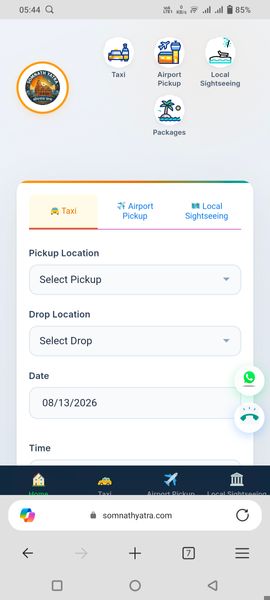
CSS layout broken on Edge Mobile (Android/iOS) — fine on other mobile browsers Mobile
Our website rendering is severely broken on Edge Mobile, while displaying correctly across all other major mobile browsers like Google Chrome and Mozilla Firefox. The visual layout and styling degrade in Edge Mobile, making key components distorted or misaligned. Target Website: https://somnathyatra.com | Tested on Android / iOS using the latest version of Microsoft Edge Mobile compared against Chrome and Firefox. Steps to reproduce: Open https://somnathyatra.com on a mobile device using Microsoft Edge Mobile, then compare the layout, font alignment, and container structure against Chrome or Firefox on the same device to observe the layout breakage. Could this be related to a specific WebKit/Blink engine rendering difference in Edge Mobile, or a missing CSS vendor prefix / CSS Grid bug specific to the Edge mobile app? Any guidance on CSS overrides or specific Edge Mobile browser compatibility fixes would be greatly appreciated!17Views0likes0CommentsWhat is EdgeSafeHostingExtensionEnabled about?
Hello, with v145 the EdgeSafeHostingExtensionEnabled policy was introduced. The description says, "Microsoft Edge Safe Hosting component extension is installed automatically when users visit supported Microsoft services, such as Microsoft 365 Copilot app." Is this a regular browser extension? If so, what is the related Extension ID? How does this combine with other extension management policies? Or is it a browser component, which should show up under edge://components? What would be its name? What is the exact purpose of "Microsoft Edge Safe Hosting component" extension? Thanks for any hints. BR Joe411Views1like3Commentsandroid links
I use edge on my desktop and would like to use it on my android phone. I use Opera on my android because it allows me to save a website link to the home screen with the correct icon for that page. If I try to do the same thing with edge it simply produces a plain icon with a single character (probably the first letter of the link), which means there are several such links all with the same character, which are indistinguishable from each other. Is there a workaround?38Views0likes1CommentEdge MV2 Deprecation Timeline?
Chrome has laid out a timeline for deprecation of Manifest V2 (https://developer.chrome.com/docs/extensions/develop/migrate/mv2-deprecation-timeline) and it's mentioned that MV2 extensions will stop working gradually post June-2024. I couldn't find any update regarding Edge. Will the same timeline be applicable to Edge too or will there be a different timeline that Edge targets? The last article regarding Edge MV3 timelines I was able to find was here: https://learn.microsoft.com/en-us/microsoft-edge/extensions-chromium/developer-guide/manifest-v3 but that seems outdated.2.9KViews0likes1CommentDesktop slideshow doesn't work with multiple virtual desktops
To reproduce the bug: If you don't have multiple virtual desktops press Win Key + Tab and click the "New Desktop icon. Press Control key + Win Key + left arrow to go to Desktop 1. Right click on the desktop and select "Personalize" Click the "Background" panel. Select the "Slideshow" option from the drop-down box. On the "Choose a picture album for a slideshow" panel choose a folder with some pictures for the slideshow. On the "Change picture every" panel choose 1 minute from the drop-down box. On the "Shuffle the picture order" panel turn the switch to "off". On the "Choose a fit for your desktop image" choose "Fill" from the drop-down box. Dismiss the "Personalization > Background" by clicking the X at the top right of the window. Press Control key + Win Key + right arrow to go to Desktop 2. Press Control key + Win Key + left arrow to go to Desktop 1. Right click on the desktop and select "Personalize" Click the "Background" panel. You will notice that the drop-down box is showing "Picture" Windows 11 will not let you keep a slideshow if you want to move from one virtual desktop to another.Solved6.8KViews11likes17CommentsEdge Workspaces gone missing
Hi there! I'm a bit lost here, would appreciate if you guys can help me out. So today I logged in to my computer and went to Edge, as usual, but to my surprise, ALL my workspaces are simply gone, there is no sign of any of them. I was hopping I could find them somewhere on my sharepoint or onedrive, and I'm becoming a little bit desperate of losing it all...5.5KViews1like6Comments
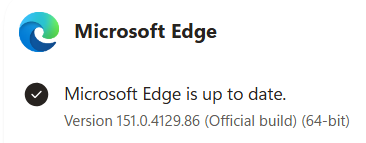
Webview2 exe missing after edge update
After the recent edge update, the webview2 exe is not updated together. C:\Program Files (x86)\Microsoft\Edge\Application\151.0.4129.59\msedgewebview2.exe is missing. This breaks webview2 apps on Windows. Is there some change to location of webview2? Any new API to get the location of the new webview2, or this is a genuine bug that need to be resolved by Microsoft?111Views0likes1Comment
Edge Color Limitations for Workspaces
Earlier today, I installed the latest Edge updated and noticed that my color options for themes has been severely limited, with very poor choices. I am a heavy user of Workspaces in Edge and rely on colors to quickly identify each workspace that I use for different projects. Previously, I had a mixture of dark and light colors assigned to different workspaces that were a quick visual identifier. To get any sort of color separation, I now need to go with the light color theme to identify my workspaces. These colors are not as distinctive for me and the dark therme colors are so close together in the color palette, there is absolutely no distinction. Additionally, the new light theme even makes the tabs within the brwser harder to differentiate or distinguish. The tab icons are too softened and difficult to discern. While I don't mind suggestions or options for my personal settings, I do not appreciate being artificially limited to what the Microsoft design team has determined to be aesthetically pleasing. This should be a matter of choice. No one is a better expert on what works best for me than myself. Lately, I'm noticing in multiple Microsoft applications, visual design changes are being made arbitraily that negatively impact my daily workflow, with no added benefit.42Views0likes0Comments
Solution for PWAs not appearing as separate apps on Linux taskbars
Hi everyone, I recently Installed Microsoft Edge stable on Kubuntu Linux, and I ran into some problems using Progressive Web Applications (PWAs). Launch one Edge PWA (say, Microsoft Teams). It appears normally. Launch a second PWA (say, Microsoft Outlook). Both windows — and every PWA you launch afterward — collapse into a single taskbar group under the first PWA’s icon, identified as msedge. Pinned PWA launchers never show as running. Pinning a running PWA window produces a generic page icon that launches the bare Edge browser when clicked. Launching a PWA from the application menu briefly shows the launcher’s startup placeholder in the taskbar, which then disappears and is replaced by a separate, unassociated entry. This isn’t KDE-specific. GNOME users have also reported issues. After some troubleshooting with Claude, the issues were traced to a mismatch between how the PWAs are identified in the .desktop PWA launchers created by Edge and the app ids reported to Wayland, starting in September 2025, when Wayland was used by default. Identifier Value Example (Microsoft Outlook) Window app_id (native Wayland) msedge-_<appid>-Default msedge-_lkkahpbimdkjdjjiijflmhaeameegbcm-Default Desktop entry filename msedge-<appid>-Default msedge-lkkahpbimdkjdjjiijflmhaeameegbcm-Default StartupWMClass= in that file crx__<appid> crx__lkkahpbimdkjdjjiijflmhaeameegbcm So the solution is StartupWMClass in the .desktop launcher for the PWA to the Wayland app_id. I have a simple Bash script that will do this for all currently installed PWAs as a workaround, but the automod removed that post the last time I tried to post it. The suggested fix for Microsoft This should be a small change to Edge’s desktop-entry generation on Linux: write the Wayland app_id (msedge-_<appid>-<profile>) into StartupWMClass=, or better, make the window app_id match the desktop entry basename per the freedesktop convention. No compositor-side changes are needed — the verified workaround above demonstrates that. I’ve reported this through Edge’s in-browser feedback tool (Alt+Shift+I) with the full diagnosis. If you’re affected, sending your own feedback referencing the same details is the best way to get it prioritized — the in-browser channel is what reaches the Edge team’s triage.168Views3likes1CommentEnhanced Security hinders performance of WASM applications (Including Blazor)
Hi, is there any official advice on what to do about "enhanced security" absolutely nuking performance of WASM? https://github.com/dotnet/aspnetcore/issues/48754 https://github.com/dotnet/aspnetcore/issues/56806 These existing tickets that were closed on the AspNetCore side, and it's been many years it seems and this is still an issue? I've submitted feedback through edge on this before but I have no way of knowing if this has been answered/looked at. We have a user who's required to have it on by policy and can't add it to the whitelist, and it's causing a pretty severe performance degradation. It just seems odd to me that the same company can produce two tools, and one of them absolutely breaks the other with seemingly no way to manage the downside at all.59Views0likes2CommentsSeriously...? WHY is the "OPEN FAVORITES in NEW TAB" Setting gone again...???
This is getting absolutely rediculous.... Comes and goes willy nilly.... I stopped using the "workaround" script in the Shortcut Link, thinking you guys finally got your act together, but you didn't, so now I have to hunt that down and hope it still works. (BTW it does...) Right Click the Edge "Shortcut", click Properties, add the below to the End of the "Target" field, with a space between the text there and this. That's what I've done, works for me. The setting is back. "--enable-features=msFavoritesOpenInNewTabSetting" Further, why the heck is that Setting STILL not on my WORK Edge install? I mean, that's where I MOST need it, so I don't accidentally overwrite a page I'm working on. The level of incompetence with this company astounds me, a simple setting as this they can't keep working or add. Don't get me Started about Windows 11, the worst Start Menu they've ever created, completely UNUSABLE for us Power Users, you could have at least included it in Windows PRO, same for the proper Explorer Menu Bar, missing things with Taskbar, etc. NEVER going to Windows 11 until you fix all this... A person shouldn't be FORCED to use 3rd Party Applications in order to FIX the things we most work with, for them to work properly. I have literally over 100 Apps in my Start Menu all organized, grouped, labeled, and sized how I like. Win11 is literally UNUSABLE for me.1.3KViews0likes2Comments



Events
Recent Blogs
- 8 MIN READMicrosoft Edge for Business, the new, dedicated work experience for the Microsoft Edge browser, is now available in Microsoft Edge stable version 116. All customers who sign into Edge using Microsoft...Aug 04, 2023302KViews2likes73Comments
- Microsoft Edge for Business, the new, dedicated work experience for Microsoft Edge, is in preview today! Microsoft Edge for Business is planned to be the standard browser experience for organi...Jul 11, 202310KViews3likes2Comments