Forum Discussion

Cannot Connect to VMs in Windows Admin Center
 Aug 03, 2026
Hi there,
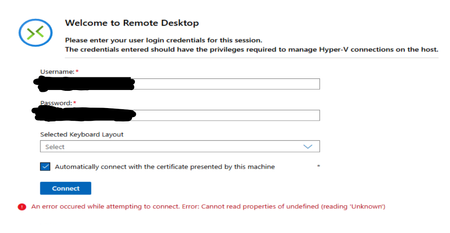
So for us the issue wasn't anything on the hardware or OS side but for some reason the WAC extensions were just not working. We turned off automatic update extensions and reverted to previous extension versions.
WAC Version: 2410
Build: 2.4.2.1
The relevant extensions with the versions we are using:
Cluster Manager: 5.2.6
Remote Desktop: 6.0.20
Virtual machines and switches: Version 6.2.6
Hope this helps

Because the cluster and VM inventory still load, I would troubleshoot the VMConnect extension path rather than rebuilding Windows Admin Center again. From the WAC gateway, confirm the browser can reach each host over the management network and that CredSSP/WinRM settings have not changed. Then test VMConnect directly from Hyper-V Manager on one host using the same admin account. If Hyper-V Manager works but WAC stays on the loading screen, update Windows Admin Center and its extensions, clear the WAC gateway cache, and collect the browser console error plus WAC gateway logs. That evidence is more useful than another fresh WAC install.