Forum Discussion

Cannot Connect to VMs in Windows Admin Center
 Aug 03, 2026
Hi there,
So for us the issue wasn't anything on the hardware or OS side but for some reason the WAC extensions were just not working. We turned off automatic update extensions and reverted to previous extension versions.
WAC Version: 2410
Build: 2.4.2.1
The relevant extensions with the versions we are using:
Cluster Manager: 5.2.6
Remote Desktop: 6.0.20
Virtual machines and switches: Version 6.2.6
Hope this helps

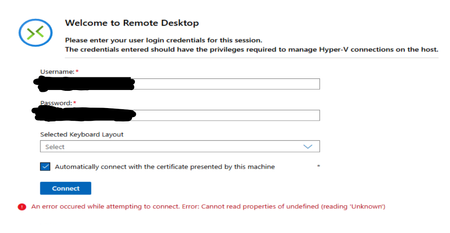
The screenshot narrows this down: cluster inventory works, but WAC's browser-based VMConnect fails while the keyboard-layout field is unset and returns a JavaScript “undefined” error. Because it follows fresh gateways and two WAC versions, this alone does not show that Hyper-V or the guests are unavailable. First, explicitly select a keyboard layout before Connect. Retry in current Edge or Chrome InPrivate. If that works, clear cached site data for the WAC gateway. From Virtual Machines, try Download RDP file and open it with Remote Desktop Connection, using an account that can administer the Hyper-V host; success isolates the fault to WAC's web console. Confirm the Windows Admin Center and WinRM services are running. If it still fails, collect Microsoft-ServerManagementExperience errors from Event Viewer and a sanitized browser HAR during reproduction. Submit those, both WAC versions, and the exact error to Windows Admin Center feedback.
Thank you for the suggestions and time! We found the issue was specific with the extension versions so after reverting to previous versions the problem was solved.