Forum Discussion

Resize-StorageTier / Expand Volume on Windows Server 2025 Campus Cluster does not work
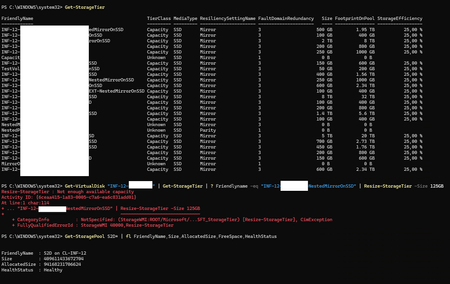

The pool’s raw free capacity is not the same as capacity that a Storage Spaces tier can extend. Resiliency, column count, fault domains, and the distribution of free extents can leave space visible in the pool but unusable by that tier. First confirm that the pool, virtual disk, physical disks, and storage jobs are healthy. Run Get-StorageTierSupportedSize for the exact tier and treat its reported maximum as the expandable size. If it has not increased, verify that new drives are eligible, balanced across required fault domains, and compatible with the tier’s media type. Allow optimization or rebalancing to finish before retrying. When supported space becomes available, resize the storage tier first, then the virtual disk, and finally the partition. Avoid forcing a size from the pool total. If supported size remains unchanged after healthy rebalancing, collect cluster and Storage Spaces health data before treating this as a Server 2025 defect
 lkrklJul 28, 2026Copper Contributor
Hi Jamony, Hi all,
Im working with Thomas / OP on this case.
We checked the Available Size for the corresponding Tier and see that starting from the available pool space, the calculated max size matches the available size for the resiliency level (Free in Pool ~225TB, efficiency 25% / Nested Mirror in a 4-Node Campus Cluster --> ~56,25TiB; Get-StorageTierSupportedSize for the Tier/Volume reports 56,13TiB)We try to expand this volume from 100 to 150GiB, so there should be more than plenty of free space
Optimize-StoragePool is running for ca. 3 seconds when i trigger it, before it finishes successfully.
I then checked the balancing of the created virtual disks on the pool - all disks are equally used with plenty of free space. I also checked via a script using Get-PhysicalExtent, if the disks were too fragmented and not enough continuous space was free, but that also came out negative.
The interesting thing is that for Resize-StorageTier I see no actual storagejobs, so it fails in the pre-check phase.I tried finding any matching errors or warnings in the cluster logs I get from Get-ClusterLog, but nothing pops up when I try to resize and search for the timestamp.
The only diagnostic log entry i could find was in Microsoft-Windows-StorageSpaces-Driver/Diagnostic, both events in the same second as my Resize attempt:
Event ID 1001 (Information): Pool {UUID} is beginning transaction SetTierInfo at sequence number 275.Event ID 1002 (Information): Pool {UUID} completed transaction SetTierInfo with status The physical resources of this disk have been exhausted. at sequence number 275. DispatchTransaction took 0 100ns intervals. PrepareCommit took 0 100ns intervals. CommitTransaction took 0 100ns intervals. CommitDevices took 0 100ns intervals.
So all transactions triggered are taking 0x100ns intervals, which seems also a bit short - even for just a pre-check event... But it also could be me, interpreting this message wrong.
Any more ideas?
Regards, Lukas