Forum Discussion

PGomersall
Apr 28, 2021Brass Contributor
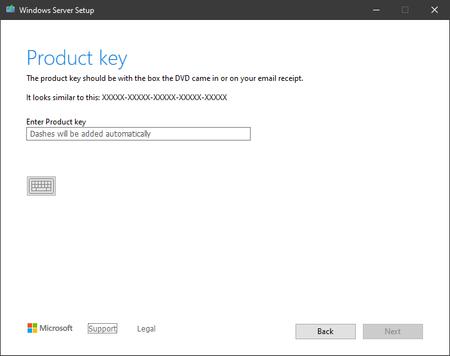
Windows Server Preview Build 20344 requesting product key
Mary Hoffman Running setup, Windows Server Preview Build 20344 is requesting a product key and no way to continue without entering one. Previous PK's do not work; how are we supposed to install an...
- Apr 28, 2021
This one got me for a few minutes too. After looking again, in the announcement post, it says to skip putting in a product key. I did so using the old school way of using an ei.cfg, and it worked.
To do so, extract the contents of the iso to a folder, go to the sources folder, make a new text file called ei.cfg and put this in it:
[Channel]Retail[VL]0
Then running setup shouldn't ask you about a product key.


Mary Hoffman
Apr 29, 2021Former Employee
During the development cycle, we provide pre-release keys with unlimited activations for testing purposes. As we get closer to the end of the development cycle, that function must be turned off. A clean install will still allow you to skip entering a product key and test without activating.

AzureMurph
May 18, 2021Copper Contributor
- AzureMurphMay 18, 2021Copper ContributorHey Mary, understood. No idea why anyone would even contemplate putting an insider build in production.
I've been having a lovely time getting it running on my laptop as my main O/s.
Quite a bit quicker than running Windows 10. - Mary HoffmanMay 18, 2021Former EmployeeBuild 20344 is not the final build for this release. Even if activated, it would not be supported. Updates would not be offered nor would they install. Language packs will not install. Insider releases are for testing purposes only and are not for use in production environments.