Forum Discussion

Windows Server 2019 - 1809 - Build 17763.107 - LAN names return .local
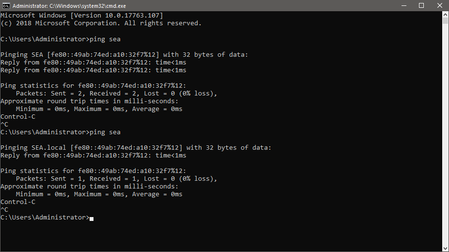

This ".local" bug might also be a related problem for this:
https://support.microsoft.com/en-gb/help/4471218/mapped-network-drives-don-t-work-in-windows-10-version-1809
.local bug still present in 17763.253, Windows 10 Pro 17763.253 does the same.
While pinging or trace routing a windows name in local network, ipv6 always returns .local
Example:
Pinging SEA.local [fe80::49ab:74ed:a10:32f7%3] with 32 bytes of data:
Reply from fe80::49ab:74ed:a10:32f7%3: time<1ms
If IPV6 is turned off and only IPV4 is used it always displays normal name "SEA" Example:
Pinging SEA [192.168.0.4] with 32 bytes of data:
Reply from 192.168.0.4: bytes=32 time<1ms TTL=128
.local name only appears if ipv6 is in use, because of this bug some network shares might not work correctly as SMB uses local ipv6 addresses to resolve Windows name.
*This does not happen in Windows Server 2016 (all latest updates). Windows Server 2016 always displays correct name via ipv6 local name in my example:
Pinging SEA [fe80::49ab:74ed:a10:32f7%3] with 32 bytes of data:
Reply from fe80::49ab:74ed:a10:32f7%3: time<1ms