Forum Discussion

Karl-WE
May 07, 2022MVP
b25110 Settings App / USOClient will retain pending updates and update history after IPU from WS2022
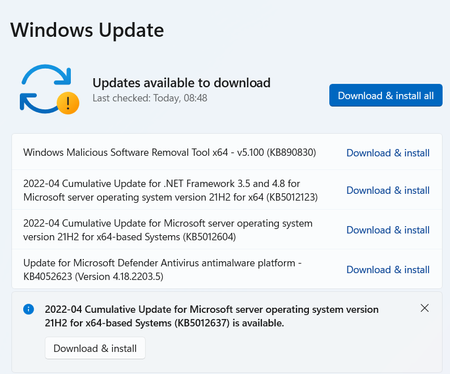
Anyone else seeing that these updates are stuck in this state and won't get installed? actually when you select the extra update below it throws an error code

abbodi1406
May 08, 2022Steel Contributor
If you would like to clear the cache (reboot might be needed afterwards)
run via admin cmd
powershell -nop -ep bypass -c "Get-WindowsUpdateLog -LogPath %temp%\temp.log -ForceFlush -Confirm:$False -ErrorAction SilentlyContinue"
@wmic service usosvc call StopService
@wmic service wuauserv call StopService
@del /f /q "%WinDir%\Logs\WindowsUpdate\*"
@del /f /q "%ProgramData%\USOPrivate\UpdateStore\*"
@del /s /f /q "%ProgramData%\USOShared\Logs\*"
@rd /s /q "%ProgramFiles%\UNP"
@wmic service wuauserv call StartService
@wmic service usosvc call StartService
@UsoClient.exe RefreshSettings- Karl-WEMay 10, 2022MVP
Thanks for your help abbodi1406. I will transform this into a full PS script. There is always something to learn from you about servicing 🙂 While I always wondered why USO is so mystical and does not talk with sconfig or WU, interesting to learn it hold its own logs and update store, instead / in addition to softwaredistribution.
