Forum Discussion

Karl-WE
May 19, 2022MVP
b25110 Enabling nested virtualization will only be visible in PowerShell and WAC but not accepted
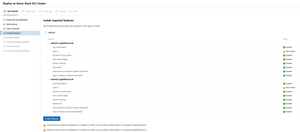
I have created new VMs with WAC 2110.2 GA and enabled Nested Virtualization Trying to create an Azure Stack HCI cluster with AzStack HCI 21H2 on WS vNext b25110. Problem: Nested virtualization ...
- May 20, 2022
Hi Karl! Thanks for trying Azure Stack HCI!
The short answer is what you're seeing is actually expected. The reason is that officially, Azure Stack HCI is only supported on physical hardware. And in some nuances, it's not the same as nested virtualization. More specifically, because Virtual Secure Mode (VSM) is enabled by default, that "hides" necessary virtualization extensions from the Hyper-V compatibility checker. That said, if you use Enable-WindowsOptionalFeature, it will bypass the compatibility checker and should successfully enable Hyper-V. So, try this:
Enable-WindowsOptionalFeature -Online -FeatureName 'Microsoft-Hyper-V'Here's a slightly longer explanation for those curious: https://twitter.com/pronichkin/status/1294308601276719104
