Forum Discussion

Windows Server 2012 R2 GPM>windows setting> security setting >Account Policy missing
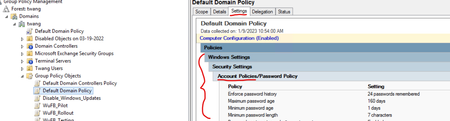

Thank you Harm for your response, I did download the latest Policy definitions an placed them in the "policies" folder. but it doesnt create the central store. Im not sure what the case is for that
I have the paths
Window> Sysvol>sysvol>domainname>policies
Windows>Sysvol>Domain> Policies
and severhostname>Sysvol>twang>policies

KrisC5 You should create the PolicyDefinitions folder inside the Policies folder, which would be c:\windows\sysvol\domainname\policies\policydefinitions. (The other paths should be the same content-wise ) Inside the policydefinitions folder, you copy all the admx files and the en-us folders (And other languages if needed) containing the adml files. This should look something like this : (Both from domain and local path, same folder)
If you reopen the Group Policy editor and edit the policy, you should see the Account Policies folder inside the GPO.
- KrisC5Jan 10, 2023Copper Contributor
Yes thats the path i mentioned, they are in the policies folder, but still it is not creating a central store. i have the downloaded Policy definitions with all the language and ADMl/ADMX files still in that folder
- Jan 10, 2023
Windows 2012 R2 server? Could you try using the Group Policy editor from a workstation? Did you log off and log in again? The central store is the PolicyDefinitions folder. You don't have to do anything else.
- KrisC5Jan 10, 2023Copper Contributori am on a workstation and loging off and in again didnt do anything. Ive been dealing with this since the middle of december, and heard the same thing you mentioned.
I questioned if it was cause ours uses the path\\serverhostname\sysvol\domain instead of, \\Domainname\sysvol\domain which is how ive seen it. But the \\serverhostname shouldnt be the issue from what i learned.
Im not sure why it has all the setting and recognizes the variable like attempts, age, complexity, but account policies is still missing