Forum Discussion

osamamansoor
Mar 17, 2022Brass Contributor
Unable to Delete File from Shared Folder
Hi, I have a shared folder on which data is created from Linux machine and it's shared and we daily deleted files from this shared folder to maintain free space but one file is unable to delete a...
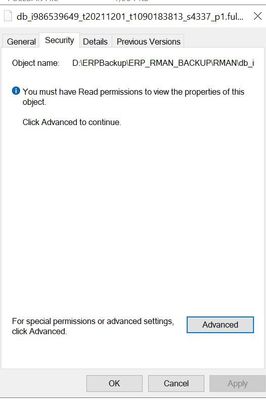

Gary_Reynolds
Mar 18, 2022Copper Contributor
Start Command prompt with run as administrator
change to the directory containing aclviewer
type aclviewer.exe /F
In ACLviewer, enter directory path, as before, then select the file you are unable to delete, this should show the permissions that are assigned.
change to the directory containing aclviewer
type aclviewer.exe /F
In ACLviewer, enter directory path, as before, then select the file you are unable to delete, this should show the permissions that are assigned.

osamamansoor
Mar 18, 2022Brass Contributor
- Gary_ReynoldsMar 21, 2022Copper ContributorHave a look at this Q&A question, as it contains instruction that might help
https://docs.microsoft.com/en-us/answers/questions/497224/unable-to-display-current-owner.html - osamamansoorMar 21, 2022Brass Contributor
- Gary_ReynoldsMar 21, 2022Copper ContributorI can't the lower status bar from the screenshot, I'm assuming there is not a error message displayed when clicked on the file.
Assuming there is no error displayed. the file is owned by the local administrators, Ensure your account is a member of local administrators and complete the following steps
Right-click on a file in ACL Viewer.
Select Properties.
Click the Security tab
Click Advanced.
Click "Change" next to the owner name.
Click Advanced.
Click Find Now.
Select your username and click OK. - osamamansoorMar 21, 2022Brass ContributorAny help ?