Forum Discussion

Promoted Windows Sever 2019 to DC, getting many Event ID 37 errors
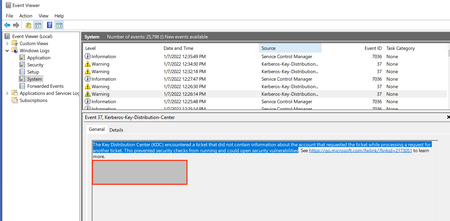

Both of those are already installed on the 2019 server.
When I go to the 2008 DC and check Windows Updates there is only one (1) that is needed: It is a Windows Malicious Software Removal Tools x64 KB890830.

For 2008 SP2 (vista kernel) install the SSU
https://www.catalog.update.microsoft.com/Search.aspx?q=KB4493730
followed by the latest cumulative update.
https://www.catalog.update.microsoft.com/Search.aspx?q=KB5008274
- rsn71Jan 07, 2022Tin Contributor
KB4493730 says "The update does not apply to your system"
KB5008274 says "The Windows Modules Installer must be updated before you can install this package. Please https://support.microsoft.com/?kbid=925316, then retry setup."
The URL in the above dialog box reply, is the same it takes me to - a general support page.
When I saw The update does not apply, I looked at the System Tab it says Windows Server Standard FE. (??)
I inherited this system from the previous employee, so I have no one to ask question about setup.
**UPDATE: When I try to search for the KB in the URL KB925316 in the Windows Catalog nothing shows.- Dave PatrickJan 07, 2022MVP
It might be time to get rid of that one.
Windows Server 2008 for Windows Essential Server Solutions - Microsoft Lifecycle | Microsoft Docs
I don't think that one can be covered by extend security updates
How to use Extended Security Updates (ESU) for Windows Server | Microsoft Docs
- rsn71Jan 08, 2022Tin ContributorThats what I am trying to do - get rid of the DC.
I thought I would setup a new DC in the domain and then promote it to primary, so I could disable the 2008 DC.
Do you have any suggestions on how to accomplish this?
Everything was going along so well until this issue. 😞