Forum Discussion

Hyper-V replication
- Sep 10, 2026
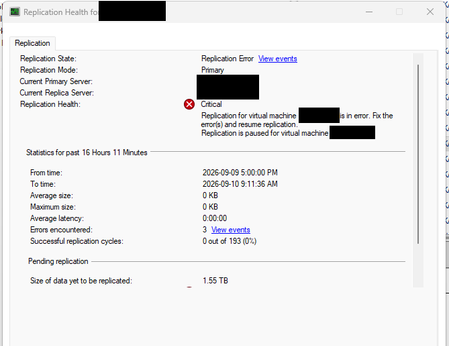
Your screenshot shows replication in an error state with approximately 1.55 TB pending, but it does not show the event that caused replication to stop. Removing and recreating replication can mask that underlying problem. Start with View Events and record the event ID, error code, and timestamp. Check the corresponding Hyper-V VMMS logs on both sides, then verify Replica Broker availability, authentication, connectivity, and free space on the replication storage. After correcting the reported cause, try Resume Replication rather than removing the relationship. PowerShell also provides Resume-VMReplication for this purpose. If the state specifically requires resynchronization, use its Resynchronize option and plan for the associated storage and network load. Finally, confirm that replication health recovers and the latest successful replication time advances. Share the actual event details if resuming fails; the summary alone cannot identify a reliable permanent fix.

Your screenshot shows replication in an error state with approximately 1.55 TB pending, but it does not show the event that caused replication to stop. Removing and recreating replication can mask that underlying problem. Start with View Events and record the event ID, error code, and timestamp. Check the corresponding Hyper-V VMMS logs on both sides, then verify Replica Broker availability, authentication, connectivity, and free space on the replication storage. After correcting the reported cause, try Resume Replication rather than removing the relationship. PowerShell also provides Resume-VMReplication for this purpose. If the state specifically requires resynchronization, use its Resynchronize option and plan for the associated storage and network load. Finally, confirm that replication health recovers and the latest successful replication time advances. Share the actual event details if resuming fails; the summary alone cannot identify a reliable permanent fix.

Thank you Jamony!
You are correct. I checked the VMMS logs in Event Viewer and discovered the reason for the failure. Someone increased the hard drive size but did not replicate it to the replica server.