Forum Discussion

BPA Errors: DNS can't resolve GC, Kerberos, PDC Resource Record, etc.
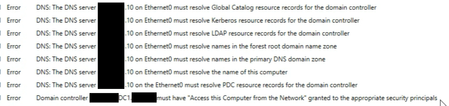

That command returns the current and only DC. I'm running BPA from that DC

Con you check if your DC is global Catalogue ?
Or via powershell
To check on the current DC you are connected to, use the following command.
Get-ADDomainController | ft Name,IsGlobalCatalog
To check all DCs on a Site, use the following command.
Get-ADDomainController-Filter {Site-eq 'Default-First-Site-Name'}} | FT Name,IsGlobalCatalog
To check all DCs in a Forest, use the following command.
Get-ADForest <Forest Name> | FL GlobalCatalogs
You can try to:
ipconfig /flushdns
ipconfig /registerdns
and restart netlogon service and test BPA again.
Just to be sure, you did put only your DNS IP on the network card, you didn't put your ISP or others DNS on the DNS of the network card ?
For the IP DNS on the network did try to you use the loopback address 127.0.0.1 and the IP address of the server ?
- L_Youtell_974Feb 19, 2025Iron Contributor
I didn't read all your first message but perhaps, you did put some modification on your local policy. You can check via rsop.msc, if you have the good setting ?
Access this computer from the network - security policy setting - Windows 10 | Microsoft Learn
- BenTheITGuyFeb 17, 2025Copper Contributor
Thanks for that AD Replication Status tool... That's helpful for testing. I decided to try all the test and that were all successful for testing...
BPA still gives errors for everything previously stated and the links to resolve the issues don't really help because they just state to make sure DNS IP is correct on the network adapter.
At a loss at this point on what do to moving forward.
- L_Youtell_974Feb 17, 2025Iron Contributor
when you run the command Get-BPAResult you should have more information who should guide you, like the example below
What you can do to is to test the port of the global catalog. Use the software GitHub - ryanries/ADReplStatus: AD Replication Status Tool and test the port
- BenTheITGuyFeb 16, 2025Copper Contributor
Quite alright... I figured that part out...
Too much to paste here but it shows all the same errors that the BPA GUI in Server Manager does.
- L_Youtell_974Feb 16, 2025Iron Contributor
Oups, Sorry i just forgot to tell you, you have to run the last command line:
mport-Module BestPractices
Get-BpaModel -> give all model available
Invoke-BpaModel -ModelId "Model BPA" -> example: Invoke-BpaModel -ModelId "Microsoft/Windows/DHCPServer"Get-BpaResult -ModelId "Model BPA" -> example: Get-BpaResult -ModelId "Microsoft/Windows/DNSServer"
- BenTheITGuyFeb 15, 2025Copper Contributor
Sorry I'm stupid... Realized I needed to do Get-BPAResult
That still returns the same errors.
- BenTheITGuyFeb 15, 2025Copper Contributor
No warnings in DNS or Active Directory in Event Viewer.
Trying BPA using Command line returns:
 Invoke-BpaModel -ModelId  "Microsoft/Windows/DNSServer"


ModelId           : Microsoft/Windows/DNSServer
SubModelId        :
Success           : True
ScanTime          : 2/15/2025 3:41:01 PM
ScanTimeUtcOffset : -05:00:00
Detail            : {Name of DC, Name of DC}
Runnings BPA in Server manager after this, still returns the errors.
- L_Youtell_974Feb 13, 2025Iron Contributor
If everything work find with DCDIAG /TEST:DNS /V /E, i don't know why BPA tell us something else. Look in the event viewer in the DNS and active directory category and check if you find some error or warning.
did you try BPA via command line ?
In powershell:
Import-Module BestPractices
Get-BpaModel -> give all model available
Invoke-BpaModel -ModelId "Model BPA" -> example: Invoke-BpaModel -ModelId "Microsoft/Windows/DHCPServer" - BenTheITGuyFeb 13, 2025Copper Contributor
Yeah all of that returns the proper server... The only DC1 I have. Decided just for kicks to try ipconfig stuff again as well as restarting netlogon... I've done that before... Re-ran BPA no changes...
I have done all these things with the loopback and the IP address of the server. No difference with either.