Forum Discussion

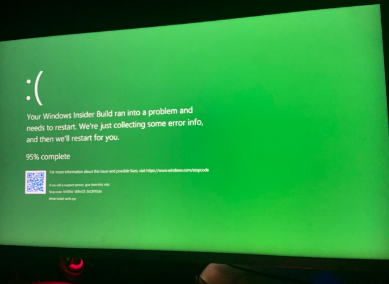
Your Windwos Insider Build ran into a problem
- Nov 03, 2021
Hi NasserNBM
As I see the screenshot, the BSOD caused by bugcheck 0x0000003b as shown execution code and memory address. There are few causes for the bugcheck 0x0000003b as below:
- Windows file corruption
- Device driver issue
- Hardware Installation/Removal
- Registry configuration
- Memory failure
I have few recommendation to resolve the issue, please run cmd in elevated mode (Run as Admin), and execute the below commands step by step:
chkdsk c: /f
sfc /scannow
dism /online /cleanup-image /scanhealth
dism /online /cleanup-image /restorehealth
The first command will scan and fix the errors on the system drive, second will check the system file corruption, the third and fourth command will use DISM (Deployment Image Servicing and Management) tool to scan/restore the health of the windows installation image.
Additionally, check for any recently added or removed hardware, and check device manager identify the unknown devices that are marked with an exclamation sign (!) in yellow color. Update these driver with release by the manufacturer.
I hope these steps could helpful for you. Please share your feedback, do not hesitate to contact me for further assistance, I will welcome all the questions you may have.

Hi NasserNBM
Press Win + X to launch Event Viewer from the power user menu. Go to Windows Logs, select System, find the event that related to Error and Warning at the time of BSOD.
 NasserNBMNov 03, 2021Copper Contributor
- SalmanAhmedNov 03, 2021Steel Contributor
Hi NasserNBM
As I see the screenshot, the BSOD caused by bugcheck 0x0000003b as shown execution code and memory address. There are few causes for the bugcheck 0x0000003b as below:
- Windows file corruption
- Device driver issue
- Hardware Installation/Removal
- Registry configuration
- Memory failure
I have few recommendation to resolve the issue, please run cmd in elevated mode (Run as Admin), and execute the below commands step by step:
chkdsk c: /f
sfc /scannow
dism /online /cleanup-image /scanhealth
dism /online /cleanup-image /restorehealth
The first command will scan and fix the errors on the system drive, second will check the system file corruption, the third and fourth command will use DISM (Deployment Image Servicing and Management) tool to scan/restore the health of the windows installation image.
Additionally, check for any recently added or removed hardware, and check device manager identify the unknown devices that are marked with an exclamation sign (!) in yellow color. Update these driver with release by the manufacturer.
I hope these steps could helpful for you. Please share your feedback, do not hesitate to contact me for further assistance, I will welcome all the questions you may have.
- NasserNBMNov 03, 2021Copper Contributor
Mr, SalmanAhmed
these are the response of the commands in cmd (running with admin)
First Command (Windwos Restarted)Second Command
Third Command
Fourth Command
Thanks you for help i really appreciate that.