Forum Discussion

Nyer00
Nov 03, 2021Copper Contributor
Windows Update broken after trying to update to Build 22494 Dev Channel
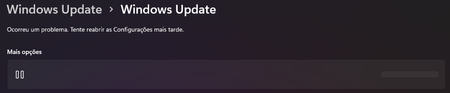
Windows Update shows up this once I've tried to update to Build 22494(Dev Channel). It says: "A problem has occurred. Try reopening the Settings later" and it doesn't show anything except for th...
 Nov 04, 2021The only way I found to fix it was to download the 22494 update manually and install it.
I perhaps shouldn't mention this here but as MS broke Windows update for me (and possibly others) here is a method to download and install manually. After I did this Windows Update is working again and I'm on the latest Dev build
https://www.youtube.com/watch?v=2Upw65LOU9Y
and
https://uupdump.net/

sinclairinat0r
Nov 04, 2021Copper Contributor
I encountered this issue randomly sometime after thehttps://aka.ms/AAeqot6 while trying to update to 22494. A reboot fixed it for me.
If that doesn't work, another thing to try is using the https://www.powershellgallery.com/packages/PSWindowsUpdate/2.2.0.2 PowerShell Module.
This is a good site that will walk you through it : https://adamtheautomator.com/pswindowsupdate/#Installing_the_PSWindowsUpdate_Module
After installing this, you can use
Install-WindowsUpdate -AcceptAll -AutoReboot
 Nyer00Nov 04, 2021Copper ContributorI've tried this and no success, it says Downloaded and then a second later it shows Failed. Thanks for replying though.