Forum Discussion

Firestar-Reimu
Sep 14, 2022Tin Contributor
Windows Spotlight on Windows 11 has a bug with its windows, two lines show beside them
Version: Windows 11 22H2 Screen Resolution: 2560x1600 Locale: Chinese, with UTF-8 support Bug: The small window on the top-right corner have a wrong transparent window layer I upgraded to ...
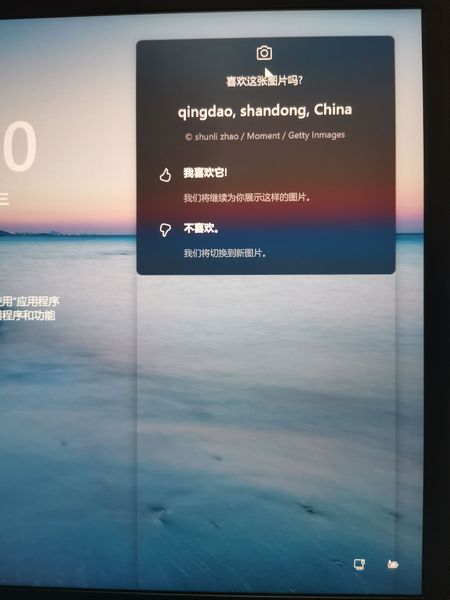

Firestar-Reimu
Sep 14, 2022Tin Contributor
yes, I have seen that
I use Beta version and I install the latest drivers
I use Thinkpad X13 2021 Intel
GPU: Intel Xe Graphics (TGL GT2)
I use Beta version and I install the latest drivers
I use Thinkpad X13 2021 Intel
GPU: Intel Xe Graphics (TGL GT2)

Deleted
Sep 14, 2022Not applicable
" it happens everytime even I use the insider beta ISO to re-install windows."
this means that you do not have applications installed by the manufacturer, which often cause problems.
The second direction would be to contact Intel , since this is a new computer, and unusual behavior may occur.
of course, scanning system files is ineffective and does not show errors?
- Firestar-ReimuSep 21, 2022Tin Contributor1. I have seen this issue on my Thinkpad and my GF's HP computer.
2. After I updated windows to 22H2 and installed all drivers from Intel etc., this issue still occur.- DeletedSep 21, 2022Not applicable
it seems that Microsoft engineers have not refined the built-in function!
Well, the Feedback Hub app for Windows is the only place to pass on this apparent error.
- Firestar-ReimuSep 22, 2022Tin ContributorFixed with Build 25131.1000.
https://aka.ms/AAh8kr0