Forum Discussion

Windows Security - Virus & Threat Protection Disabled & will not Reactivate
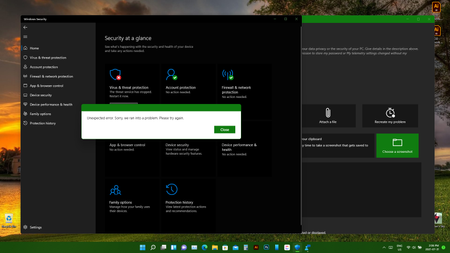

OK, so after exhausting every possible solution i could think of, including some command prompt error checks and such, I was not able to resolve this issue with Windows Security or Windows Update. AVG Antiviris did a deep scan and found two more iffy files and removed them, restarted and still nothing was working.
I finally resorted to a full roll back to a fresh Windows 10 install via USB. Installed fine, all clean, logged in and installed all my apps and programs.
I got Windows 10 Updates and checked Windows Security and everything looked good.
The problem is that in about an hour, Windows Security capped out and was disabled again. Same errors as what happened in Win11 and what's shown in my screenshot above.
So now I'm completely at a loss. Same error in both Windows 11 and now Windows 10 after a fresh install.
This is on an Acer Predator Triton 300 Laptop by the way.
For now I installed AVG again. Did a scan and it's clean, so I don't know what's going on.

Yeah, I have never rolled back to Windows 10 so I'm not sure if the errors of Windows 11 like what you're facing will come with it. I'm hoping Windows 11 DEV builds fix this Virus/Threat Protection issue soon. Only other thing I can think of is something damaged your files, maybe malware, and the malware is gone now but the damaged files are still there or gone but the damage is still present. Some would recommend clean installing Windows 10, but you can wait and see or wait into the stable version of Windows 11 arrives. You can also join the Preview Release Channel of Insider Program and you might be able to get the recent Windows 10 preview release that came out last week that maybe will fix the problem: https://techcommunity.microsoft.com/t5/windows-10/windows-10-version-21h2-announced/m-p/2554392
- PraxiusAug 01, 2021Copper ContributorThanks for the info. As noted in my previous reply, I did end up doing a fresh install of Win10 Pro, straight from MS's site and via USB, and wiped everything on the system.... But the issue came back up in this OS too.
I'll check the link and see if a newer preview might resolve the issue.