Forum Discussion

Windows 11 Sound driver problem
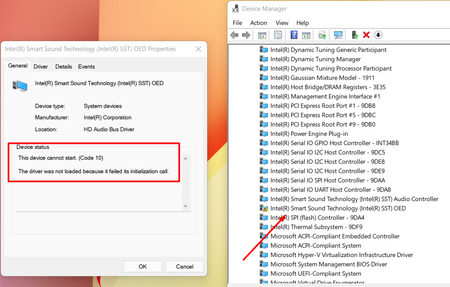

Thanks for your feedback, from the above details, I would suggest you to load the default values or factory default in system BIOS, it will be helpful in case where the BIOS value has been changed unexpectedly.

i'm sorry if my english is bad. But can you please give me steps how to do it? i'm kinda newbie on this.
- SalmanAhmedNov 12, 2021Steel Contributor
You're most welcome Vladz69, please follow the below steps to reset the BIOS values.
Restart the computer, and continuously press the F2 or Del key while the system is performing the POST (Power-On Self-Test) to enter the BIOS setup utility. Usually, the POST process starts before your computer loads the Windows, at the time when you see the manufacturer loge as in this case is the Asus.
In BIOS setup, locate the option "Load the BIOS defaults" or you can press the F9 key as well. Once you have done, you will get the confirmation message, and finally, you need to save the configuration.
To save the configuration, press the F10 key and confirm the changes. Your computer will be restarted with BIOS default values.
 faruk056Jan 12, 2022Copper Contributor
SalmanAhmed I used hp elitebook 840 g3. I downloded windows 11 with iso file. when i disable vtx(virtulazition technology) then my audio sound are not run. I try to solve this problem in various way. I i also mentioned that i am not a computer expert. here are some picture i attested which help you detected problem.
please solve this problem.