Forum Discussion

Metant
May 08, 2022Tin Contributor
Windows 11 Pro 22616.1 - Windows Defender does not open
There is no Microsoft Store during installation. I had to install Xbox to add the necessary components through it. Also, when logging into Windows Defender, it offers to open using the Microsoft Stor...
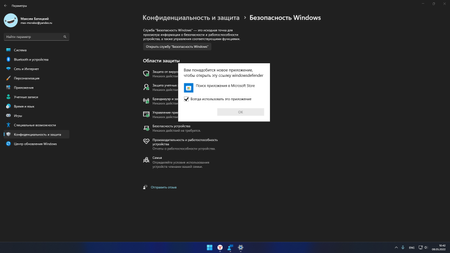

Metant
May 08, 2022Tin Contributor
I will add: There is no calculator, Weather, NotePad, Paint, Feedback Center and many more necessary utilities. Windows Update does not help to solve these problems. This may have a better effect on memory and performance, but some components are really important.
 Ada09Jul 04, 2022Copper Contributor
Metant Can you describe in details how you installed Microsoft Defender manually?
I tried going to Microsoft store to get it, but there is no "Install" button on "Microsoft Defender" page.
(Expiriencing the same symptoms as yours with 22H2 22621.169).
Thanks in advance!
 jjelliottMay 09, 2022Copper ContributorWas there something 'special' about your install? I installed 22616.1 last night and everything that you mentioned as missing is present. Not questioning you, just curious as to what might be different.
- MetantMay 09, 2022Tin ContributorI installed everything as usual. I even restored the system several times, but it still didn't help. There was nothing unusual during the installation. Are you really all right?
- jjelliottMay 09, 2022Copper ContributorWow, that IS odd. I don't see any issues at all. I have poked around at everything I could think to try. Heck even my "Show hidden icons" button is back on my tray