Forum Discussion

vaibhav27
Aug 29, 2021Copper Contributor
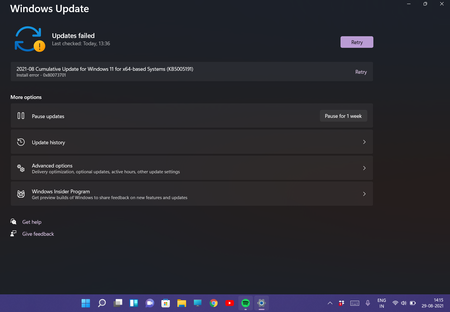
Windows 11 install error
Hey, I'm facing an error 0x80073701 while installing the windows 11 cumulative update ( kb5005191 ). I faced the same error while installing the previous cumulative update but no fixes
 Aug 29, 2021You can try to install through ISO. Right now the ISO is at .132 (as of 08/29/2021). From there see if you can upgrade up to the current build. Pick what version you want whether it be Beta or Dev. Keep in mind Dev is soon to go into bleeding edge builds so might be unstable at times and you won't be able to get back to Beta as some point soon. Here is the ISO's: https://www.microsoft.com/en-us/software-download/windowsinsiderpreviewiso

KapilArya
Aug 29, 2021MVP
Hello,
See if this support article helps you:
https://support.microsoft.com/en-us/topic/when-trying-to-install-updates-from-windows-update-you-might-receive-updates-failed-there-were-problems-installing-some-updates-but-we-ll-try-again-later-with-errors-0x80073701-0x800f0988-e74b3505-f054-7f15-ec44-6ec0ab15f3e0
Hope this helps!
See if this support article helps you:
https://support.microsoft.com/en-us/topic/when-trying-to-install-updates-from-windows-update-you-might-receive-updates-failed-there-were-problems-installing-some-updates-but-we-ll-try-again-later-with-errors-0x80073701-0x800f0988-e74b3505-f054-7f15-ec44-6ec0ab15f3e0
Hope this helps!

vaibhav27
Aug 29, 2021Copper Contributor
I've tried this already 1000's of times