Forum Discussion

Eorku
Apr 10, 2026Iron Contributor
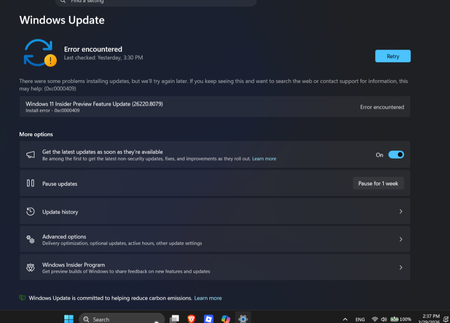
Windows 11 Insider Update 26200.8079 Fails to Install with Error 0xc0000409
My Windows 11 Beta Channel Insider Preview update (26200.8079, KB5079482) keeps failing. It hits 100% instantly on reboot, then rolls back, showing error 0xc0000409. Anyone else having this issue, or...

mohdadeeb
Apr 10, 2026Iron Contributor
This seems to be a common issue with recent Insider builds where the update reaches 100% and then rolls back with error 0xc0000409.In most cases it’s related to system file corruption or broken update components.You can try running sfc /scannow and DISM commands to repair system files.Also resetting Windows Update components or clearing the SoftwareDistribution folder has worked for many users.If you’re using any third party antivirus or VPN, try disabling it temporarily because it can interfere with the update process.If nothing works, a repair install using Windows Update recovery option might be the best solution without losing data.