Forum Discussion

Windows 11 Insider Preview Feature Update (26220.9343) is failing.
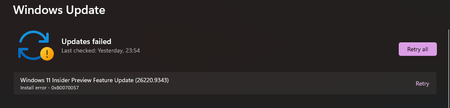

Error 0x80070057 is too general to identify the failed update component, so a clean install should not be the next diagnostic step. After the next failed attempt, open the automatically created SetupDiag results file in Windows, Logs, SetupDiag. Microsoft’s SetupDiag tool examines Windows Setup logs and reports the matched failure rule, phase, and operation. If multiple failures appear, focus on the last one because it is usually the fatal error. Save the result along with the Panther and Rollback logs, your current build, update name, installed third-party security software, and any recently connected devices. Remove personal details before sharing excerpts publicly. If SetupDiag identifies a driver or compatibility block, address that item and retry; do not remove unrelated software at random. If it shows no clear rule, submit the findings through Feedback Hub with the Insider build number rather than repeating clean installations.