Forum Discussion

paulgeanta
Apr 07, 2022Brass Contributor
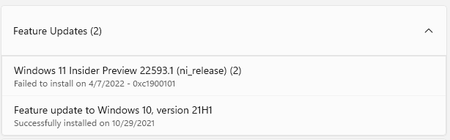
Windows 11 insider preview 22593.1 (ni_release) failing
2 previous updates were also failing with the same error. I was hoping 22593.1 will install but I got the same 0xc1900101 error: Did anyone find a solution to this besides a clean install? ...
 Apr 09, 2022you can try to turn off MSMQ (Control Panel - Programms and Components - Windows Features)

eduvz23
Apr 11, 2022Copper Contributor
- alexpol97 in my case I have had it deactivated and I have activated and deactivated with restart and it continues to stay at 61% it does not install the update
alexpol97
Apr 11, 2022Copper Contributor
eduvz23 hi, I found an error with this component in the setuperr.log, which is located in C:\WINDOWS\Panther\NewOs\Panther
You can look at this file, it is most likely indicated near the end what the problem is.
- eduvz23Apr 11, 2022Copper Contributor
alexpol97 Hello, I followed the route, I sent you the capture, it gets stuck at 61%
- alexpol97Apr 11, 2022Copper ContributorTry turning off the printer (if there is one), delete the printers in the device manager. Next, you should clear the C: / Windows / SoftwareDistribution folder (you may need to disable Windows Update, and enable it after removal).
After all these steps, try to update again through the Settings.
If that doesn't work, then burn the image of the desired version of Windows (in your case, 22593.1) to a USB flash drive. Then on the flash drive, run setup.exe with administrator rights and update like this.