Forum Discussion

Win11 25H2 File Explorer preview pane displays bitmap images incompletely
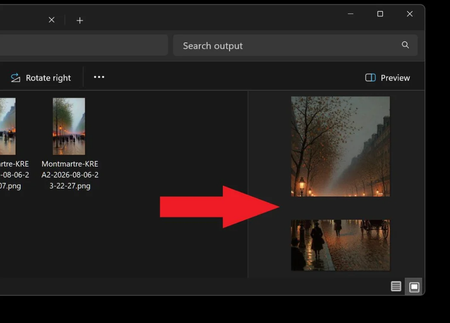

Because the bitmap opens correctly elsewhere and the gray band stays fixed in the preview area, the file itself is probably intact; the failure is limited to File Explorer’s preview rendering on that Insider build. I cannot confirm from Microsoft’s published information that this is a documented issue for build 26220.9022. Install the newest build offered for your current Insider channel, restart, and test local BMP files. Toggle the preview pane off and on with Alt+P, then clear the thumbnail cache under Settings > System > Storage > Temporary files and restart Explorer. If the problem remains, run DISM /Online /Cleanup-Image /RestoreHealth followed by sfc /scannow in an elevated terminal. Also test at 100 percent display scaling to separate a rendering/scaling issue. Finally, submit a Feedback Hub report under Files, Folders, and Online Storage > File Explorer, attach the screenshot, and use Recreate my problem so Microsoft receives diagnostic traces.