Forum Discussion

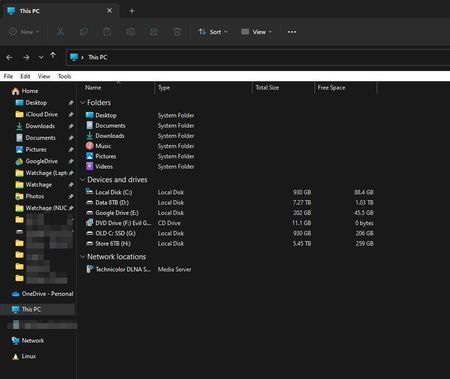
Win 11 ( 22621.160) - Dark mode - Explorer has a white toolbar - how to fix?
 Jun 23, 2022
I had the same problem and was able to fix it by going to the triple dot in the file explorer bar
then options -> view tab -> uncheck "Always show menus" (It was the second from the top for me)
I also did the registry edit in the other post, but it didn't have any effect. Not not sure if its doing something in combination with this, however.


I don't have that entry either but still randomly getting the white bar 😞
 bIOforgerJul 25, 2023Copper ContributorIt doesnt work, the white bar always comes back eventually. MS really need to fix this properly, it takes up valuable screen space on a lappy and just generally annoying.
- bIOforgerJul 25, 2023Copper ContributorThis worked initially but the white bar comes back after a while, so it doesn't work 🙂
- PillowMetalJul 04, 2023Copper Contributor
seabdelh this is a good point... I had locked the toolbar as well long ago before removing the entry but it had no effect, so thought it was not involved. However, the combination aspect is interesting and consistent with how my system is currently configured (locked toolbar, no entry) which works in my case.
 seabdelhJul 03, 2023Copper Contributorif you don't have the entry in registry and you still get the white bar, try the following:
1. create a new DWORD(32) and name it AlwaysShowMenus, set it to 1 and
2. go to file explorer -> options -> view -> and enable compact view
3. now you see a menu bar in white, right click on an empty space, and choose the option to lock the toolbar
4. now return to the registery and delete DWORD created
5. close and reopen file explorer and it should be gone forever (I hope so)
please let me know if this helped you.- PillowMetalMay 12, 2023Copper Contributor
Dragonpornit's been over a week, the longest stretch I ever had, and the bar has not returned. It certainly appears that this entry is leftover from before they reskinned and dark modded explorer and no longer applies. So it is strange and quite a bummer in your case. I suppose you could always try a clean install to see if junk is cleaned up (mine WAS a clean install and still had the setting, but when removed worked)