Forum Discussion

MarkG35
Aug 10, 2026Copper Contributor
We couldn't update the system reserved partition
I'm trying to run Windows Update to install Windows 11 Insider Preview Feature update (26220.9022) but during the download, I get the error message below:
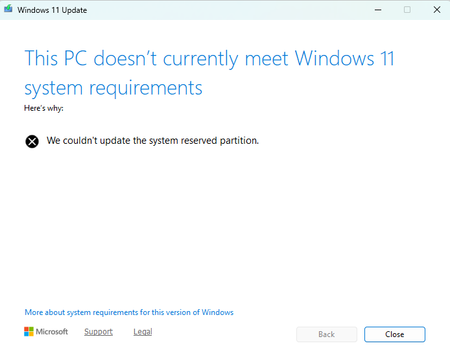
- Aug 15, 2026
Please try these steps:
- Open administrative Command Prompt, if you’re upgrading. If you’re installing, you can instead use Windows RE Command Prompt.
- Assign a drive letter ‘Y’ to SRP. Type following and press Enter:
mountvol y: /s
- Now execute Y: command to go to SRP. Then type following and press Enter:
cd EFI\Microsoft\Boot\Fonts
- So you should be now in Fonts folder. Execute this command del *.*. This should delete unnecessary fonts and free up space in SRP.
- You can now close Command Prompt.
If issue still persists, you can refer this fix:]
https://www.kapilarya.com/fix-we-couldnt-update-system-reserved-partition-in-windows-11
Let us know if this helps!
Note: Included link in this reply refers to blog post by a trusted Microsoft MVP.


Timothy1525
Aug 14, 2026Steel Contributor
You need to extend the system partition to 500 MB with a disk partition tool in safe mode.
 MarkG35Aug 17, 2026Copper Contributor
Thanks for this. My system partition is only 100MB, but deleting the fonts gave me a reprieve. I'll aim at increasing the size to 500MB in the near future.