Forum Discussion

We couldn't update the system reserved partition
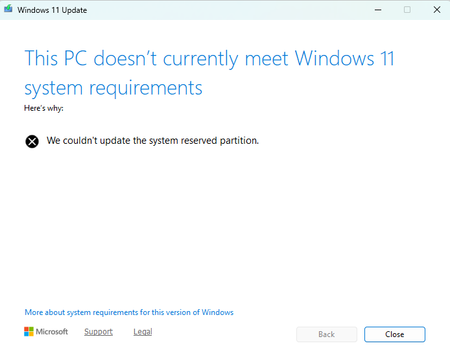
- Aug 15, 2026
Please try these steps:
- Open administrative Command Prompt, if you’re upgrading. If you’re installing, you can instead use Windows RE Command Prompt.
- Assign a drive letter ‘Y’ to SRP. Type following and press Enter:
mountvol y: /s
- Now execute Y: command to go to SRP. Then type following and press Enter:
cd EFI\Microsoft\Boot\Fonts
- So you should be now in Fonts folder. Execute this command del *.*. This should delete unnecessary fonts and free up space in SRP.
- You can now close Command Prompt.
If issue still persists, you can refer this fix:]
https://www.kapilarya.com/fix-we-couldnt-update-system-reserved-partition-in-windows-11
Let us know if this helps!
Note: Included link in this reply refers to blog post by a trusted Microsoft MVP.


Adding more detail to this post:
This PC has been running Windows 11 for 4 years. Current build is (note: dates are dd/mm/yyyy):
Windows 11 Pro Insider Preview
Version 25H2
Installed on 17/03/2026
Evaluation expires on 12/08/2026 06:09
OS build 26220.8925
Experience Windows Feature Experience Pack 1000.26100.416.0
Note that the current build is now expired but the problems started before this. Having had no replies to this post, I have unenrolled the PC from the Insider Program so it is now trying to install Windows 11, version 25H2. It starts downloading and gets to around 8% and the Windows 11 Update window pops up.
I have also enrolled a different PC into Insider Program and it has installed 26220.9022 with no problem.
It would be good to know what is going on here before I trash the machine and start again.