Forum Discussion

UmerW
Mar 13, 2023Copper Contributor
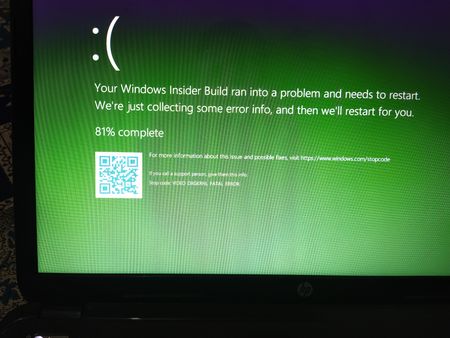
VIDEO DXGKRNL FATAL ERROR CODE
Can anyone help me?

Reza_Ameri
Mar 13, 2023Silver Contributor
Are you able to boot into Windows?
How this problem started?
Does it start when you watch video or play game or in any specific app?
How this problem started?
Does it start when you watch video or play game or in any specific app?
 UmerWMar 13, 2023Copper ContributorYes, I am able to boot into windows.
I have no idea how the problem started. So, I tried updating drivers but in vain, so I finally reinstall windows 10 but the problem is still there.
i don't play games or watch videos. It sometimes goes like this even if the laptop is on standby mode. Not even background apps- Reza_AmeriMar 14, 2023Silver ContributorTry perform Clean Boot and see if the problem persists?
Have a look at:
https://support.microsoft.com/en-us/topic/how-to-perform-a-clean-boot-in-windows-da2f9573-6eec-00ad-2f8a-a97a1807f3dd
Try run Windows Update and download and install all updates.
Visit your device's manufacturer website and download and install the latest drivers.
Make sure report this issue using the Feedback Hub app.  DeletedMar 13, 2023Not applicable
Hi, UmerW
https://support.microsoft.com/en-us/topic/how-to-perform-a-clean-boot-in-windows-da2f9573-6eec-00ad-2f8a-a97a1807f3dd
That way you can try to fix it.