Forum Discussion

SanjayPraveen3
Nov 14, 2023Copper Contributor
Unable to update Windows - Windows Insider Program
I am enrolled on Windows Insider program, and my OS is Windows 11. I was trying to update my windows for more than a year. But whenever I update any of the windows apps, it gives me the below error:...
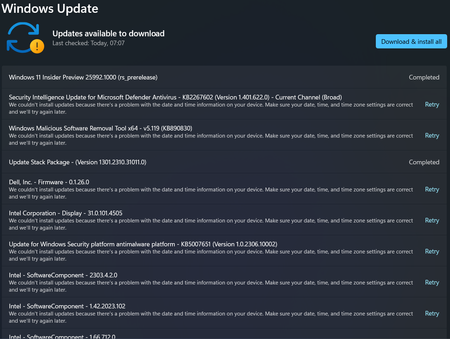

Anonymous
Nov 16, 2023Only updating with ISO can fix this:https://learn.microsoft.com/en-us/windows-insider/build-expiration
https://learn.microsoft.com/en-us/windows-insider/isos#in-place-upgrade-with-a-windows-insider-preview-iso

SanjayPraveen3
Nov 19, 2023Copper Contributor
Thanks! But whenever I try to download the file from the shared link after selecting the Insider version and language, I am getting the below Error:
Error:
We encountered a problem processing your request. Please try again later.
Error:
We encountered a problem processing your request. Please try again later.
- AnonymousNov 19, 2023
Exactly which build number do you want to download?
- SanjayPraveen3Nov 21, 2023Copper ContributorI tried to update with ISO; all the process completed and after auto restart of the system I got the below error pop-up.
We couldn't install Windows 11
We've set your PC back the way it was right before you started installing Windows 11.
0x80070002 - 0x20007.
The installation failed in the SAFE_OS phase with an error during INTALL_DRIVERS operation.
-- Can you help me with this?
Thanks- AnonymousNov 21, 2023
Driver, mouse or whatever may be causing the error:
https://answers.microsoft.com/en-us/windows/forum/all/we-couldnt-install-windows-11-error-0x80070002/40d3516a-0ce9-46d4-9b3b-374fdc771761
https://answers.microsoft.com/en-us/windows/forum/all/we-couldnt-install-windows-11-error-0x80070002/0f1f5dbf-6174-44df-8857-f85974529636
"The issue was solved after I updated my BIOS and cleared about 30 GB of my drive."
- SanjayPraveen3Nov 20, 2023Copper ContributorThe site is working now. I am downloading the file now. Will let you know for any clarifications. Thanks a ton!