Forum Discussion

F-Houghton
Dec 03, 2024Iron Contributor
Unable to prevent annoying blue prompts from appearing
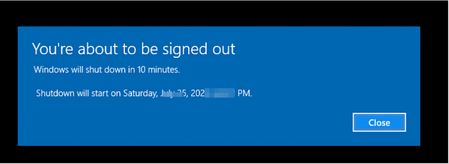
How can I prevent the blue prompts which look like the attached from appearing on Windows 10 2004? They appear from time to time. For instance, some time ago, one regarding Kaspersky appeared remindi...
- Dec 03, 2024
You can disable notifications for individual applications from the Windows Settings:
1. Open Settings (press Windows + I).
2. Go to System > Notifications & actions.
3. In the Get notifications from these senders section, find Kaspersky or any other application that sends these prompts.4.Toggle off the switch for that application.


Nobel_Baynes
Dec 16, 2024Steel Contributor
Open internet Explorer......left click the little gear icon in top right corner of screen........scroll down and left click on internet options in panel that opens Left click on advanced.
When that panel opens, Left click on RESTORE ADVANCED SETTINGS........Then left click RESET and then Left click the next RESET......then left click CLOSE. Restart your computer and behold, no blue pop-up for windows 10.